MediRecords 2.0: New ways to Care, Connect and Engage
 

MediRecords 2.0: New ways to Care, Connect
and Engage

MediRecords 2.0 is the most comprehensive overhaul of our electronic patient record and clinic management system since we launched in Australia in 2016. While there have been many product updates over the years, MediRecords 2.0 is designed to use screen space better, streamline workflows, reduce administrative burn-out and support shared care.


MediRecords Head of Product Jayne Thompson says, “Innovation is as important to us as it is to our customers”. The 2.0 product update reflects this philosophy, introducing best-in-class user experience design and other client-driven enhancements, while reinforcing the foundations for next generation digital health connectivity.  

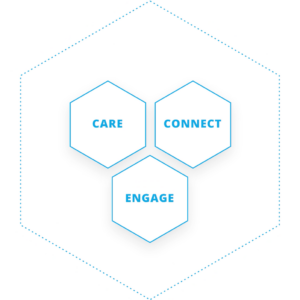
Having grown beyond its origins as Australia’s pioneering, cloud-based practice management system, the MediRecords platform is now underpinned by three pillars: Care, Connect and Engage. Each of these will gain major new features during 2023.
 

Care

The MediRecords Care pillar contains core clinical features such as patient records, ePrescribing, appointment management, investigations, billing and claiming, correspondence, and assessments. New Care functionality will include: 

  • Case Management – Members of a designated Care Team can view and update client case notes. This is particularly valuable where care is shared between a multidisciplinary team working from separate locations or across different shifts. For example, mental health practitioners can collaborate with GPs and rehabilitation specialists as patients progress towards a safe return to work. 
  • Group appointments – Patients will be able to book and join group sessions or classes. This feature will enable group therapy, family consultations and community health programs, with providers able to message an entire group or individual group members. 
  • New mental health and readiness for work assessment templates are being added, including the Glasgow Coma Scale. 
  • Single provider view of appointments: Clinicians practising across multiple clinics won’t have to jump between them to view their appointments. Appointments across multiple sites will be consolidated in a single view. 
  • New communication capability: Real time chat with team members will be available throughout MediRecords, making it easier to message team members on the fly. Our new Comms bar will also provide shortcuts to SMS, email, alerts, and notifications. 
  • Inpatients – In a major new premium* feature, MediRecords will be able to support complex care, including inpatient admissions, detailed charting, clinical escalations, progress notes and Discharge Summaries. 
  • Our Letter writer tool is having a makeover and will be even easier to use, with highly requested new functionality, such as digital signatures. 
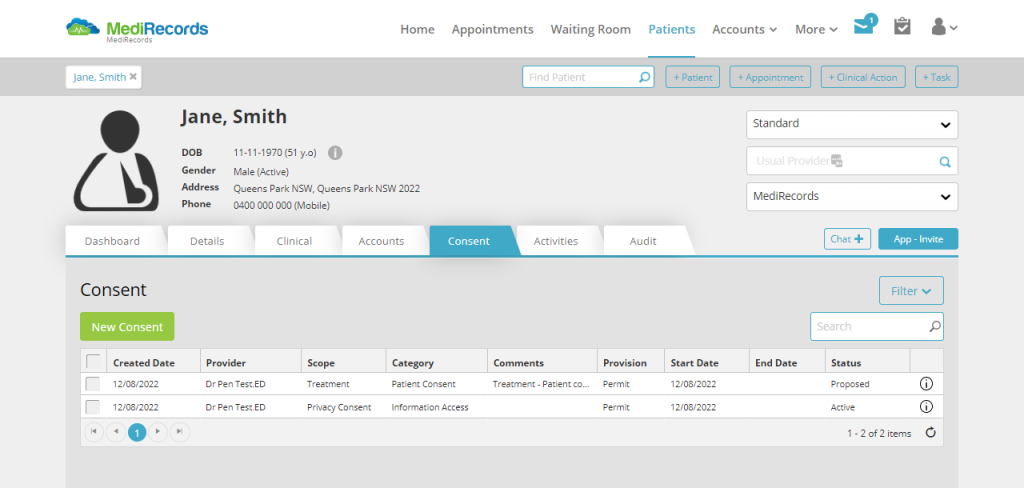
  • We’ve added industry-leading means of recording Consent (or denial of consent) and made it easier to add attachments to patient records. 
  • Custom fields and Tagging can be used in patient records, creating new and innovative ways to capture information, search records and report on data. 


Connect 

Many clients are familiar with our Connect site. MediRecords was an early adopter of FHIR (Fast Health Interoperability Resources) and API technology and new options for using these to share data are on the way. We have proven integrations with patient monitoring devices, patient-reported outcome and engagement measure systems (PROMs and PREMs), dictation technology and partner products. MediRecords is built on the SNOMED-CT-AU data coding system, which makes the data we share cleaner and primed for analytics. 

  • We now have FHIR integrations with enterprise products such as hospital patient administration systems (PAS) and scanned medical record software. This means a patient record created or updated in MediRecords can be pushed up into hospital systems, ensuring consistency of records and supporting better patient safety. Current options include allergies, medication requests and dispense notifications. 
  • New FHIR resources to be added throughout 2023 include referrals, diagnostic requests, diagnostic reports, and vital signs.  


Engage 

MediRecords has already connected over 60,000 patients to healthcare records via our patient mobile app. This enables consumers to book appointments, see medication information, receive reports and educational resources, and access and store personal health documents. We’re taking this to the next level in 2023 with an entirely new patient engagement platform. This will include new features such as:  

  • Real time surveys and forms 
  • Clinical assessment and observations data for remote monitoring 
  • In-appointment chat functionality 
  • Secure web access to personal health data. 

Frequently asked questions

MediRecords 2.0 is an overhaul of our current platform rather than a new product. All existing customers will transition to 2.0. Sticking with the old MediRecords format will not be an option.

We will perform the update remotely. Users won’t have to download or do anything.

We have done our utmost to preserve familiarity and usual behaviour within the MediRecords application, but the new layout may take some adjustment. To help with this, we have been providing Lunch and Learn sessions for clients. Please reach out to our training team if you have any further questions, [email protected].

Development will finish in March. Rigorous testing will follow before pilot sites switch to 2.0 in late April. Once we have considered their feedback, we’ll finalise the date for general release and shout it from the rooftops to let you know. 

If you are a current client, please contact your Account Manager if you would like to be a test pilot for these new features. Limited places are available.  

MediRecords 2.0 is an upgrade of your existing system and will be covered by usual licence fees. However, some of the optional new features will be Premium products and require additional fees. Details will be published as soon as possible. 


For other questions, please email [email protected].

Looking to stay updated with the latest from MediRecords?

Sign up to the newsletter

    Federal Government digital health upgrade grants on the way

    Federal Government digital health upgrade grants on the way

    Update: 24 April 2023

    New details are now available on the Strengthening Medicare General Practice Grants.

    Grants of $25,000, $35,000 or $50,000 are available depending on practice size. The grants will be administered by your local Primary Health Network (PHN) or the National Aboriginal Community Controlled Health Organisation (NACCHO). To take advantage of this funding, complete a grant application sourced via your PHN or NACCHO.


    MediRecords welcomes the news that Federal Government grants aimed at helping to enhance digital health capability for Medicare general practices and Aboriginal Community Controlled Health Services (ACCHS) will become available from April. 


    General practices and ACCHS will be eligible for one-off grants of up to $50,000 for innovation, training, equipment, and minor capital works under three categories:

    1. Enhance digital health capability – Accelerate moves to a more connected healthcare system that meets future standards;
    2. Upgrade infection prevention and control arrangements – Ensure infectious respiratory disease (e.g. COVID, influenza) patients can be safely seen face-to-face; and/or
    3. Maintain and/or achieve accreditation against the Royal Australian College of General Practitioners (RACGP) Standards for General Practice to promote quality and safety in health care.

    The grants were an election promise from then opposition leader Anthony Albanese in May 2022. The Strengthening Medicare – GP Grants Program was subsequently allocated $220 million in the October 2022 federal budget.

    Medicare general practice grants will be administered by local Primary Health Networks (PHNs) and ACCHS grants by the National Aboriginal Community Controlled Health Organisation (NACCHO). Practices and health services owned or operated by a state, territory or local government agency are ineligible.

    MediRecords Chief Executive Officer Matthew Galetto welcomed the move and said he hoped it signalled a shift to better data connectivity between GPs and the broader health care system.

    “We would like to see incentives for general practices to switch to the cloud, given the environmental, security and interoperability benefits that flow from leaving behind legacy software and hardware systems.”

    Mr Galetto said the grants program was an opportunity for the Federal Government and PHNs to drive industry-wide reform and boost adoption of new technology platforms.

    “Just as PIP (Practice Incentives Program) grants helped shift GPs from paper-based systems to electronic, this grant funding should seek to do the same for next generation interoperable technology.”

    “This is bigger than improving the My Health Record. There is an opportunity to follow the United States example and provide genuine connectivity of digital health records for patients, from primary to tertiary care.”

    MediRecords is a true cloud electronic health record system featuring global standards-based interoperability and SNOMED-CT-AU clinical coding. MediRecords pioneered cloud practice management software in Australia and is now used by general practitioners, specialists, multidisciplinary clinics, hospitals, and government departments.

    Practices considering using their grant to upgrade to cloud clinical software are welcome to reach out to MediRecords. We provide onboarding services including training, data migration and configuration of electronic prescribing, telehealth integration, Medicare claiming and more.


    Looking to stay updated with the latest from MediRecords?

    Sign up to the newsletter

      MediRecords Product Update: Consult & Consent File Upload
       

      Product update:
      Consult & Consent
      File Upload

      Attach consultation or consent documents to a patient record
      within MediRecords today!

      MediRecords has recently released a file upload function for practices that wish to attach consultation or consent documents to a patient record. The upload function can store files of many types for capturing consent or consultation documentation.  

      This feature will mean you can ensure important patient information is captured and attached to their patient record, such as:   

      • Uploading hand-written patient consult notes for providers who prefer analogue note-taking.  
      • Attaching any auxiliary information related to a patient’s consultation that may have been generated outside of MediRecords.  
      • Upload a signed consent form to the relevant consent record, to keep the documentation together and secure.  

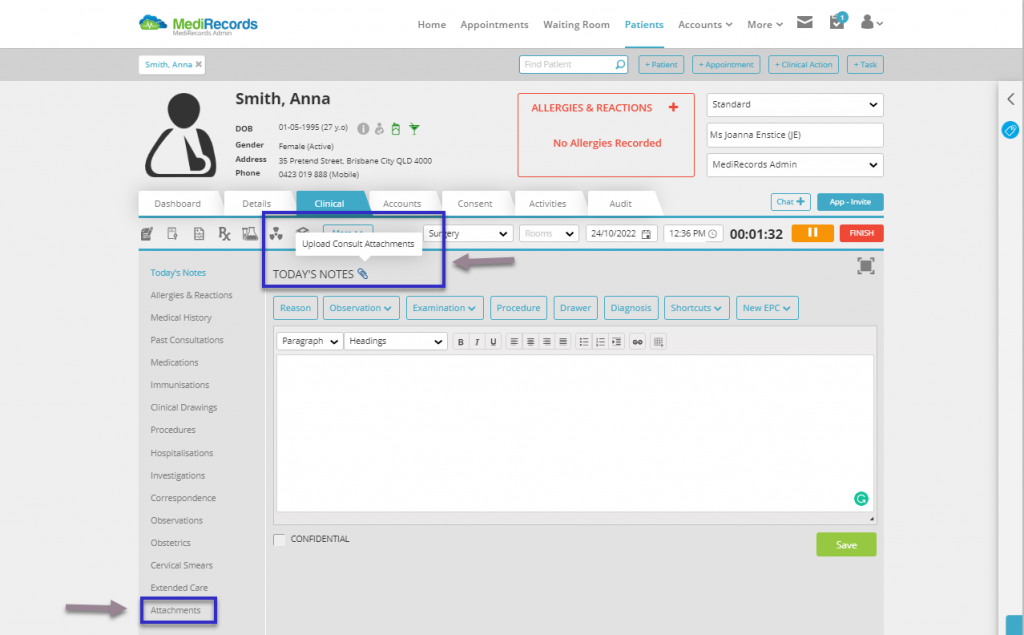
      Files can be uploaded to the consultation via the clinical tab by clicking the paperclip icon beside Today’s Notes heading in the main panel and following the upload instructions. There is also a new Attachments tab on the side panel, which can be used to look for and view attachments made to a consult.   

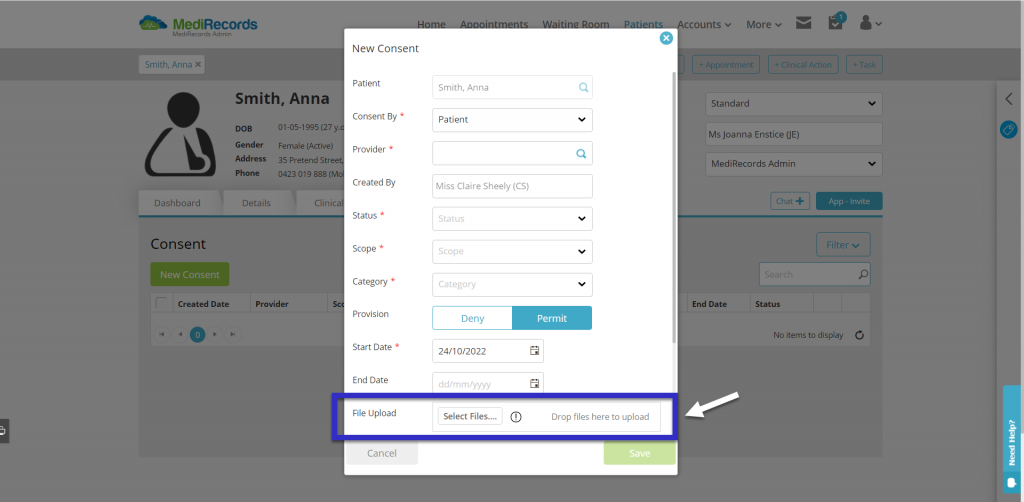
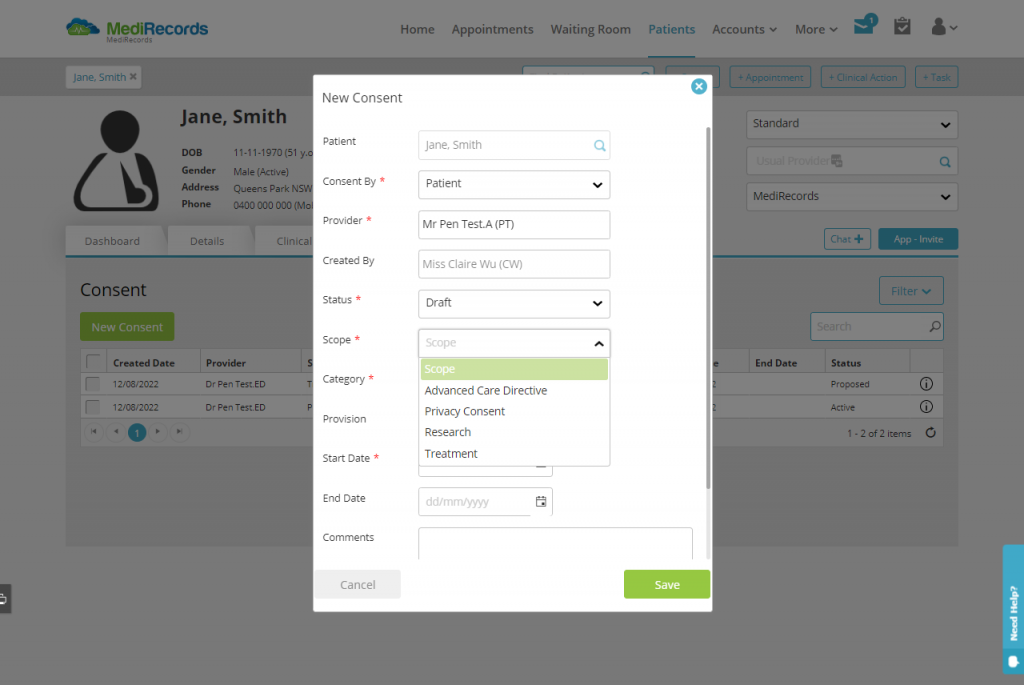
      The Consent module now includes a file upload function where you can easily upload the documentation when creating a new type of consent. 


      For full information and step-by-step instructions on using MediRecords Consult & Consent File Upload functionality, please view our Knowledge Base articles below or contact our friendly Support team.  

      All new customers are welcome to book a demonstration to learn how MediRecords can support your organisation today. 


      Looking to stay updated with the latest from MediRecords?

      Sign up to the newsletter

        MediRecords Product Update: Consent Module
         

        Product update:
        Consent Module

        MediRecords is excited to announce another product update, the Consent Module.

        The Consent Module addresses a critical need in healthcare – the need to capture and store electronic consent forms (and help make clipboards and paper-based questionnaires a thing of the past). 

        MediRecords’ Consent Module has the flexibility to record consent for various procedure types or investigations. The Consent module is per-patient and used to capture and store the Consent type, scope, and associated documentation required (coming soon). 

        It shows exactly what the patient has provided consent for or rejected. This includes concepts such as Advanced Care Directives, information disclosure to third parties, acceptance of privacy policies and more. 

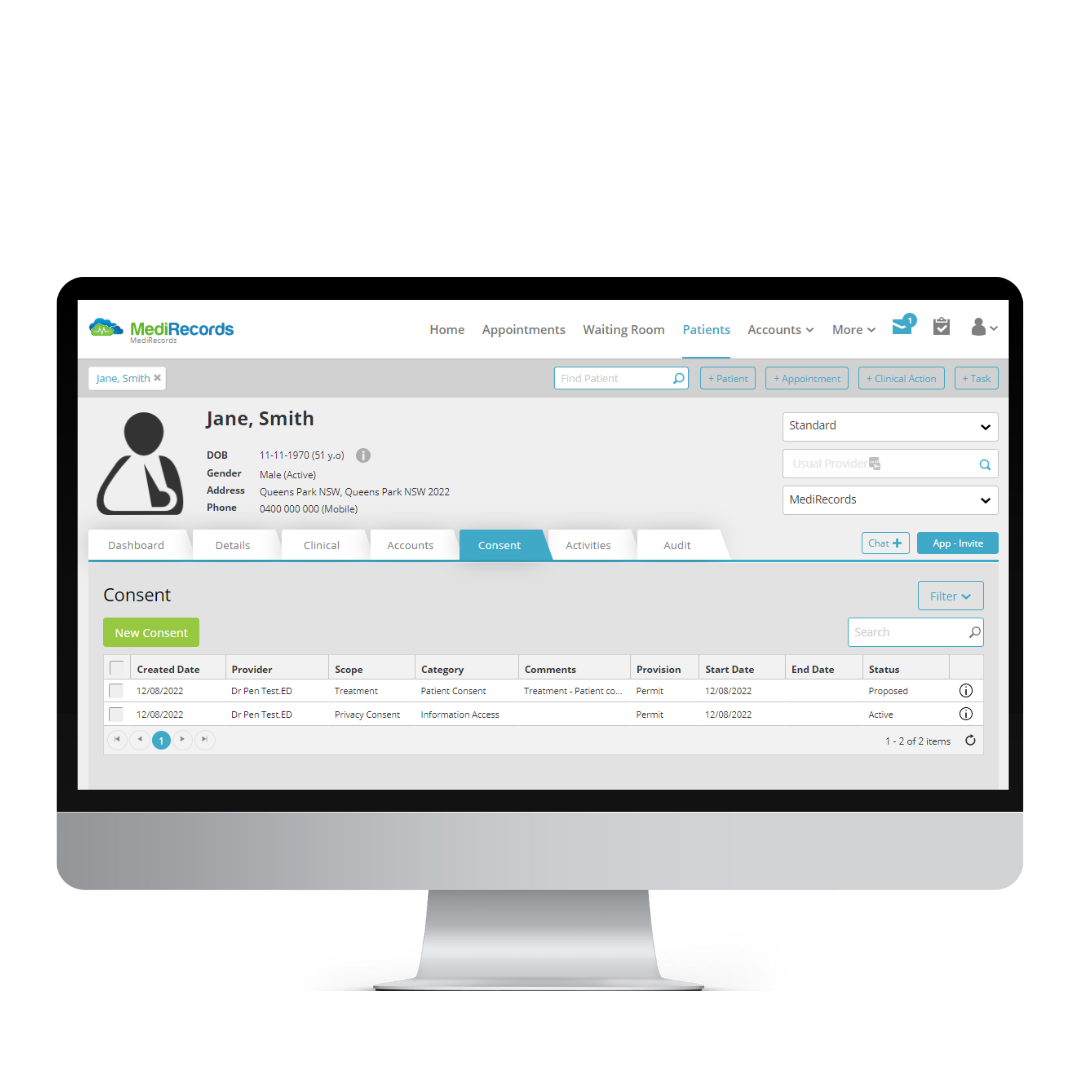
        You can open this new feature via a new tab at the top of the patient record, for quick viewing access. Potential ways to use the Consent Module include: 

        1. New Patient Registration form – patients can sign consent for a practice to begin collecting their medical information 
        2. Advanced Care Directive – patient provides consent for their care if they become unable to make these decisions themselves 
        3. Procedural consent – Useful in pre-admission workflows – consent for upcoming procedures or treatment 
        4. Do Not Resuscitate – orders given by the patient not to resuscitate if they fall unconscious

        Future enhancements are imminent for this feature. In future releases you will be able to upload a Consent document directly to the Consent record, so that you can store paper consent forms along with electronic records.  

        To learn more about the Consent Module and how you can implement it for your business, please follow the link to our Knowledge Base articles below or contact our friendly Support team. 

        If you have feedback on our new feature, please reach out to your account manager. We would love to hear from you!  

        Consent Module Support Knowledge Base article 

         All new customers are welcome to book a demonstration to learn how MediRecords can support your organisation today

        Looking to stay updated with the latest from MediRecords?

        Sign up to the newsletter

          MediRecords Product Update: Work Lists & User Groups
           

          Product update:
          Work Lists &
          User Groups

          MediRecords launches Work Lists and User Groups

          A lot of product development has been happening here at MediRecords, and we’re excited to launch two new features with you – Work Lists and User Groups!

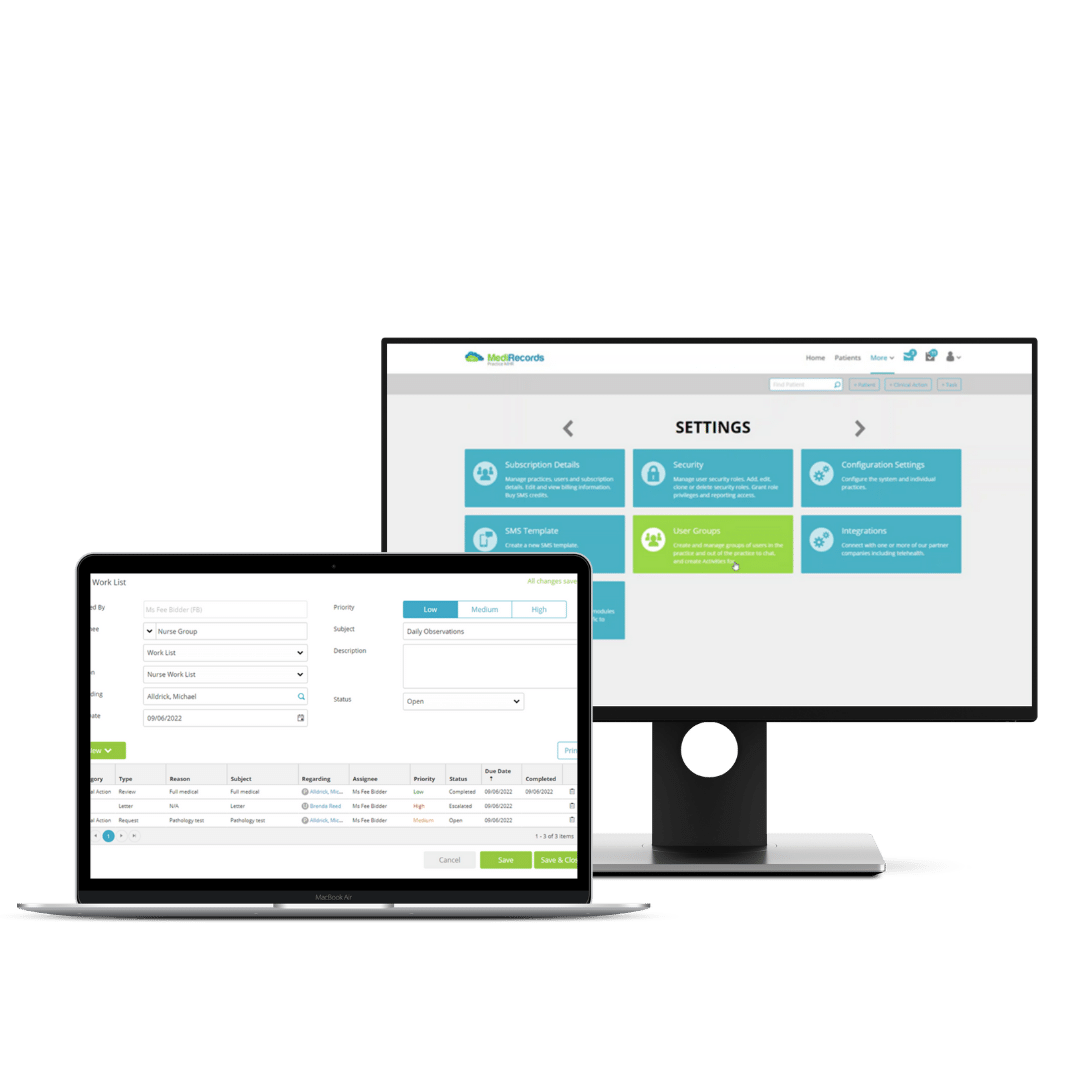
          Works Lists and User Groups will assist staff in creating efficiencies across their day by helping them keep track of and set due dates for work items, and ensure tasks are completed on time. This feature will also allow staff to create work items for individuals or a group of their colleagues to complete.  

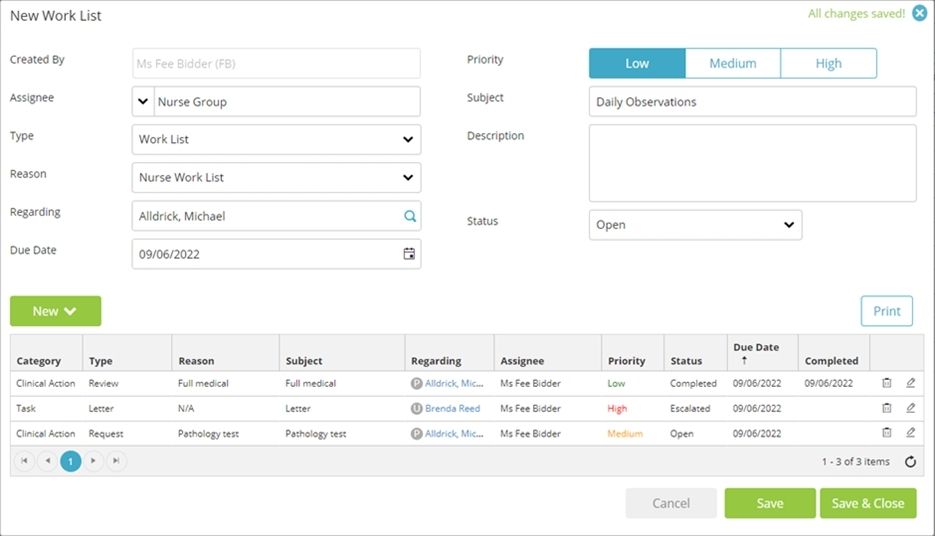
          Through Work Lists, you can create a list of Tasks and Clinical Actions and then share the list with a group of users. When a Task or Clinical Action is marked as completed by someone in the user group, this will update the item for all users assigned to the group. 

          Benefits: 

          • Keep track of work items in MediRecords, so other staff can assist if a colleague is absent. 
          • Comprehensive medicolegal audit trail, storing activity records against a patient.  
          • Drive efficiencies in daily activities through setting due dates for Tasks, Clinical Actions and Work Lists, and receive notifications of upcoming work items that are due for completion. 
          • Manage patient-centred workflows such as Care Plan-related tasks and other chronic disease management programs.  

          Worklists:  

          Work Lists allow you to create Tasks and Clinical Actions to track the ongoing care of single or multiple patients. Each activity is stored against the patient record, providing a comprehensive medicolegal audit for items related to patient care, both clinical and administrative.  

          For example, if a nurse needs to make observations of multiple patients on a particular day, completing this via a Work List will streamline the process and ensure that each time the nurse updates a completed task, it will be saved against the patients’ clinical record.  

          Work Lists can also be printed as a day sheet of items to complete, making it easy for staff to work through their daily requirements. 


          User Groups:  

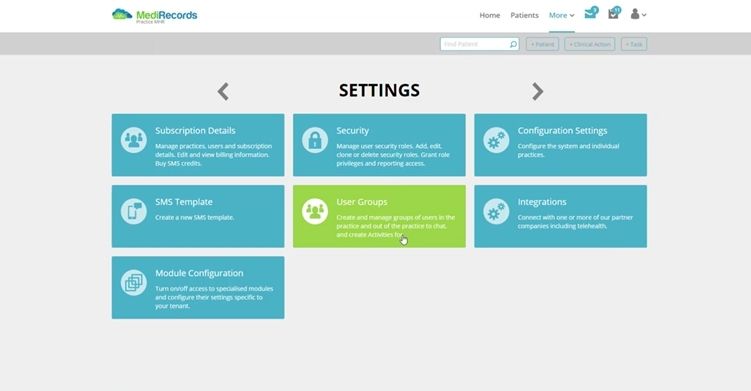
          Create groups of users to send Clinical Actions, Tasks, or Work Lists to multiple team members. For example, once set up, you can now send a task to all nurses at once, notifying all users in that group. When a user in that group updates the task, this will update the item for all users assigned to the group. 

          To learn more about Work Lists and User Groups and how you can implement them in your business today, follow the links to our Knowledge Base articles below or contact our friendly Support team. 

           We look forward to hearing how you’re using this handy new functionality. 

          Work Lists and User Groups Support Knowledge Base article links: 

           All new customers are welcome to book a demonstration to learn how MediRecords can support your organisation today. 

          Looking to stay updated with the latest from MediRecords?

          Sign up to the newsletter

            NetMD – How MediRecords has taken the remoteness away from general practice

            How MediRecords has taken remoteness away from general practice.

            Andrew Dyson MR Connect

            Andrew Dyson, Digital Health Business Consultant

            NetMD are a medical centre with a difference. Their aim is to use modern technology to deliver general practice.

            NetMD do this, using MediRecords, Coviu and e-scripts, to offer medical teleconsultations online. Sixty percent of their consultations are now performed this way.


            The Challenge

            “I was working with Medical Director,” says NetMD general practitioner, Dr Leo Gunaseelan, “It cost $80 to $100K to install, plus a technician to fly from Cairns to do this at $3K a day, and yearly maintenance costs of $15 to $20K. With MediRecords I can manage everything myself, and I don’t need anyone’s help. I have freedom.”

            Dr Gunaseelan specialises in family medicine and rural medical care. He runs NetMD as an online teleconsulting service to ensure he is accessible to patients, no matter where they are based.

            “I have been working with MediRecords for five years,” says Dr Gunaseelan, “They are great, and have good support staff. MediRecords are fully cloud-based and I never need to take a day off. I have one week away a month and just work from wherever I am. That way, my patients don’t miss out on treatment.”


            How is MediRecords Used?

            Patients don’t need any special equipment to access NetMD services– just a phone, and a mobile or internet signal.

            “Patients love it,” says Dr Gunaseelan, “You don’t need high quality internet- just a satellite signal will do. Patients don’t need to come into the practice. I can provide my services to them from anywhere in the world, and it’s working well.”

            Dr Gunaseelan has been practicing for over 30 years, throughout rural New Zealand, Europe and the remote mining regions of Australia.
            “My work with Rio Tinto involves looking after patients from Tasmania and remote Queensland. I can train medical staff in the mines to use and read the medical equipment, and then I can read the results from wherever I am. Remoteness has been taken away.”
            Patients can also book consultations on the NetMD website and use the MediRecords app to access test results straight away.

            “The app is the main point of difference,” says Dr Gunaseelan, “I have 3,000 patients, and they all use it and check it regularly. Before, I had a nurse, who was only looking after recalls by phone and mail. Now I don’t need her- I just click a couple of buttons and a text is sent to my patient with a link to make an appointment. It’s as perfectly simple as that.”

            In addition, MediRecords provides health to visitors to Dr Gunaseelan’s general practice.

            “I look after about 15,000 tourists every year,” says Dr Gunaseelan, “In two minutes they have the prescription they need emailed to their phone. They always say, ‘wow, why don’t we have this at home?’”


            Looking Forward

            Dr Gunaseelan is so pleased with MediRecords that he plans to expand the reach of his services.

            “I want to widen the breath of services we offer online, with payments being made available online, and I’m also working to integrate a YouTube channel by the end of next year,” says Dr Gunaseelan, “I want to extend my services to Papua New Guinea, the Solomon Islands and Samoa. I want to provide services for people that don’t have access. I have always wanted to do this, I just didn’t know how.”

            “It’s a great program,” says Dr Gunaseelan, “If I could, I would promote MediRecords to anyone. They improve general practice immensely.”

            For more information on NetMD and Dr Gunaseelan’s work visit netmd.com.au.

            To find out how MediRecords can support your organisation to expand into virtual care and telehealth services, you can contact Michael Alldrick on email at [email protected].

            Andrew Dyson MR Connect

            Andrew Dyson, Digital Health Business Consultant

            Looking to stay updated with the latest from MediRecords?

            Sign up to the newsletter

              MediRecords Product Update August 2021
               

              MediRecords Product Update: August 2021

              Fee Bidder - Headshot cropped

              Fee Bidder, Junior Product Owner

              See what we’ve been working on and released over the last month...

              We are excited to announce the recent changes and updates we have released into the Medirecords product. Below you will find a summary of each of the changes we have made. 

              Increased File Size Upload Limit

              The file size limit has been increased across MediRecords, to allow you to upload larger file sizes. This change affects the following areas within MediRecords:

              • Clinical Drawings (Patient Clinical & Resources)
              • Patient Clinical – New Correspondence In
              • Patient Clinical – Correspondence Out (imported documents)
              • Secure Messaging Inbox
              • Secure Messaging Outbox
              • Investigation Results
              • Bulk Scan Upload
              • Referrals

              Provider Number Added to Health Professionals Grid

              You may now view the provider number for a contact from within the Health Professionals grid within Resources. 

              Interested Parties & Usual GP Mail Merge Fields Added

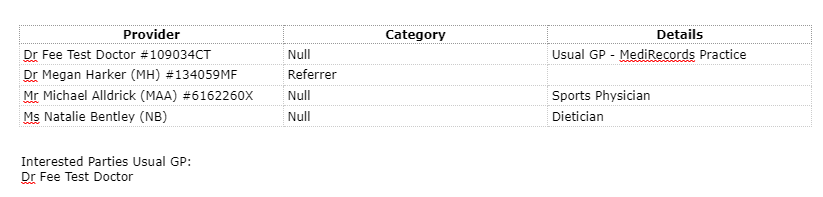
              New mail merge fields have been added to the letter editor, so you may now import a patient’s Interested Parties and Usual GP directly from the patient’s record. These fields are found within the Patient table when editing a template or letter. When using these fields, the following will occur:

              Interested Parties:

              • The Provider’s name and Provider Number will be imported (if recorded against the Contact record).
              • The Category of Referrer will display if the party were recorded in the Referral section in Patient Details.
              • Any notes recorded for the Interested Parties will be displayed in the Details field.

              Usual GP:

              • The Interested Party marked as the patient’s Usual GP in their Interested Parties will be displayed.


              Search by Provider Number on Health Professionals Grid

              You may now search by a provider by entering their provider number into the search bar available at the top of the Health Professionals grid. Results will be returned when you have entered a minimum of 3 characters from the beginning of the provider number. 

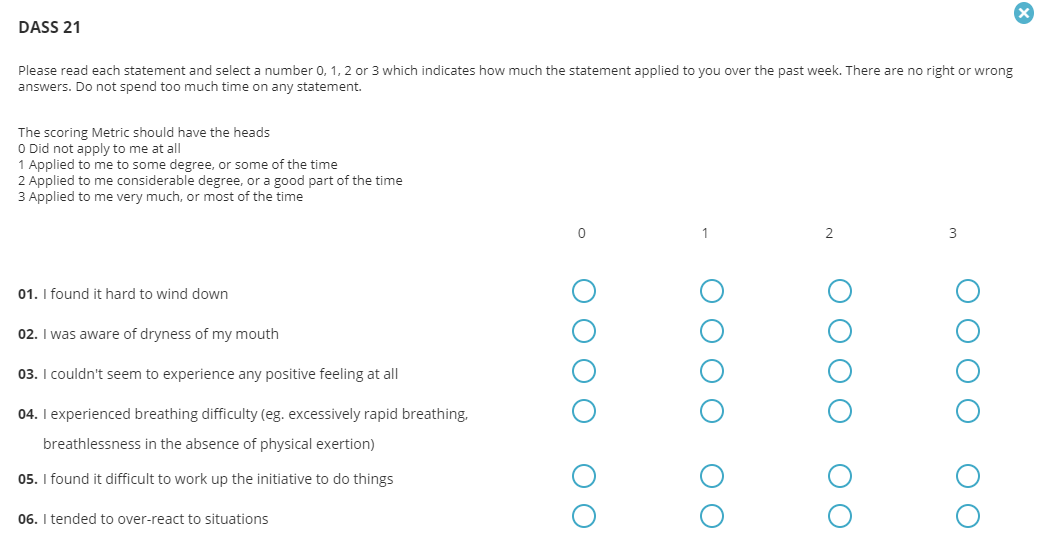
              Depression Anxiety Stress Scale (DASS21) EPC Template Added

              The DASS21 form is now available as an EPC template within the consultation window. Answering the questions will provide a scoring for each category, and an overall scoring with appropriate diagnosis.


              Chronological Appointment Agenda View

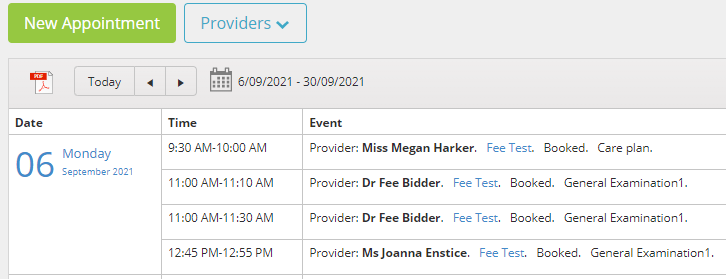
              The Agenda view in Appointments will now display all appointments in chronological order, rather than grouping the appointments by provider. This improvement aims to improve the Agenda’s usefulness when looking to see the appointments booked for a certain patient, or provider.


              Stickiness Implemented in Contacts Area

              When searching in the Health Professionals or Service Provider grids, you will no longer lose your search term after opening and closing a record. This assists with finding the correct contact record where a contact may have multiple records for different locations.


              Stickiness in Filters Applied for Tasks/Activities

              When applying filters within the Tasks/Activities window, you will now be able to apply separate filters for each patient.

              These changes have come about from customers like you, who have given us their feedback.  MediRecords is committed to continuous improvement to allow for ease of use of our product, so if you have any feedback, please let your account manager know!

              See you next month for more exciting new features and functions within MediRecords.

              Fee Bidder - Headshot cropped

              Fee Bidder, Junior Product Owner

              Looking to stay updated with the latest from MediRecords?

              Sign up to the newsletter

                MediRecords Product Update July 2021

                MediRecords Product Update: July 2021

                Fee Bidder - Headshot cropped

                Fee Bidder, Junior Product Owner

                See what we’ve been working on and released over the last month...

                We are excited to announce the recent changes and updates we have released into the Medirecords product. Below you will find a summary of each of the changes we have made. 

                Observations Improvements

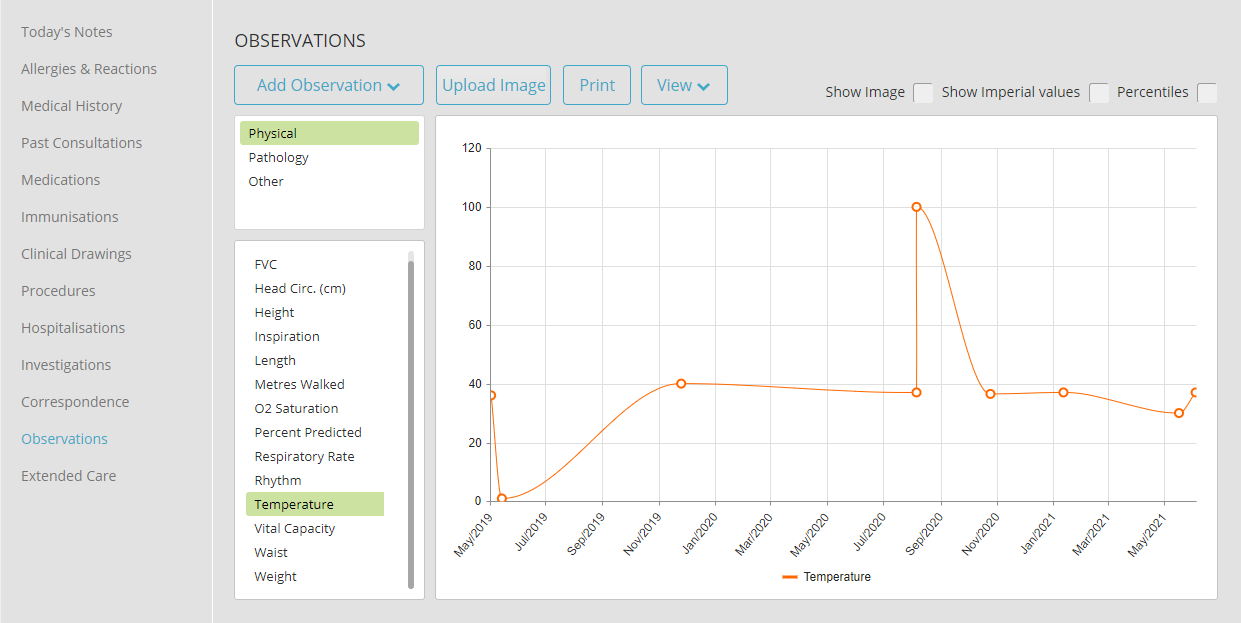
                Improvements have been made to the Observations function, so that all observations may now appear within the timeline graph view, rather than a selected amount, improving visibility of a patient’s health over time.


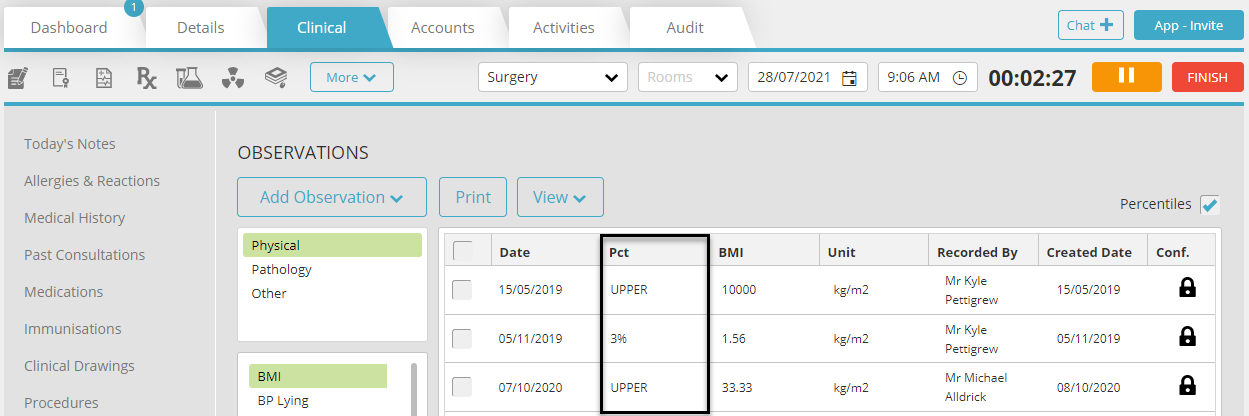
                Percentile Value Added to Observations Grid

                The PCT value will now display within the Observations grid when the Percentile tick-box has been selected.


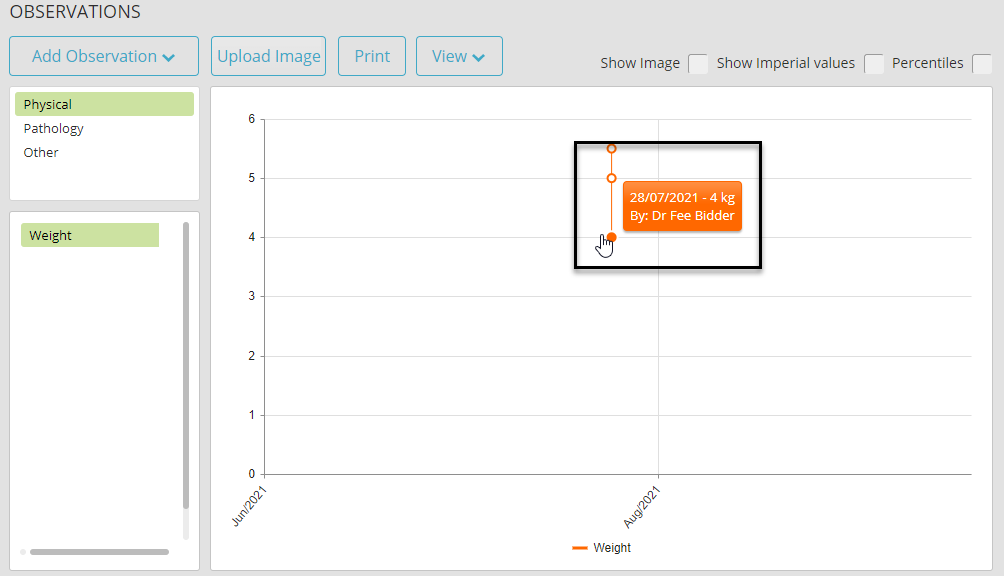
                Added Hover Information to Timeline View

                Hovering over an entry in the Observation Timeline view will now display the percentile value, the user who created the entry, and the date of entry.

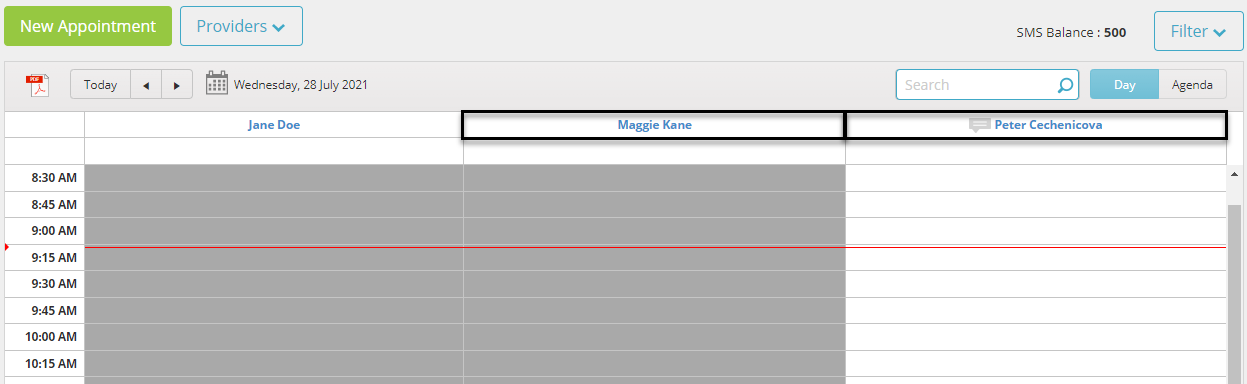
                Appointment Book Username Update

                Provider usernames have been updated within the Appointment Book to display First and Surname. If a status has been added to the provider and their full name exceeds the character limit, then only the provider’s surname will be displayed alongside the status.

                Given Field Added to Immunisations Grid

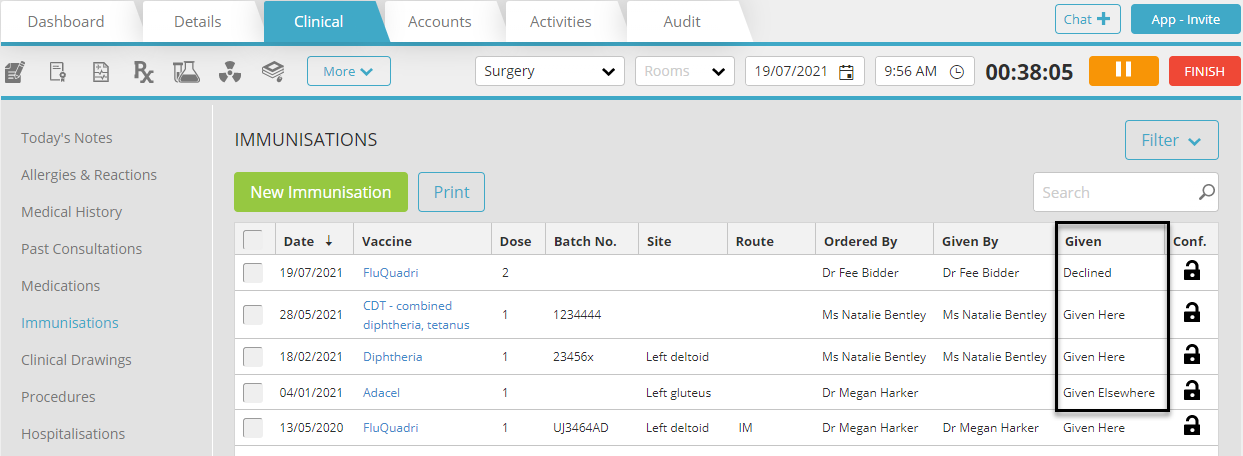
                The Given Field is now available within the Immunisation Grid, so you may tell at a quick glance whether an immunization was given elsewhere, given within the clinic, or if the immunization was declined.


                Practice Wide Patient Chat

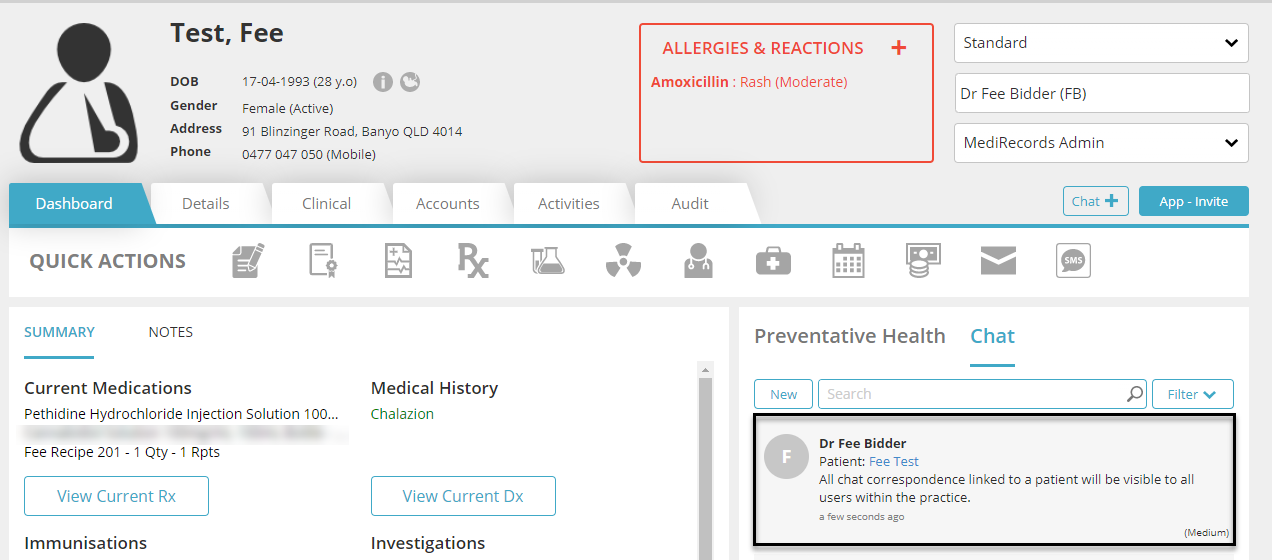
                Users may now view all chat threads on a Patient Record Dashboard, regardless of who created the chat message or received it. This ensures that all chat correspondence is available on the Patient Record for all users.


                Comments Added to Investigations Grid

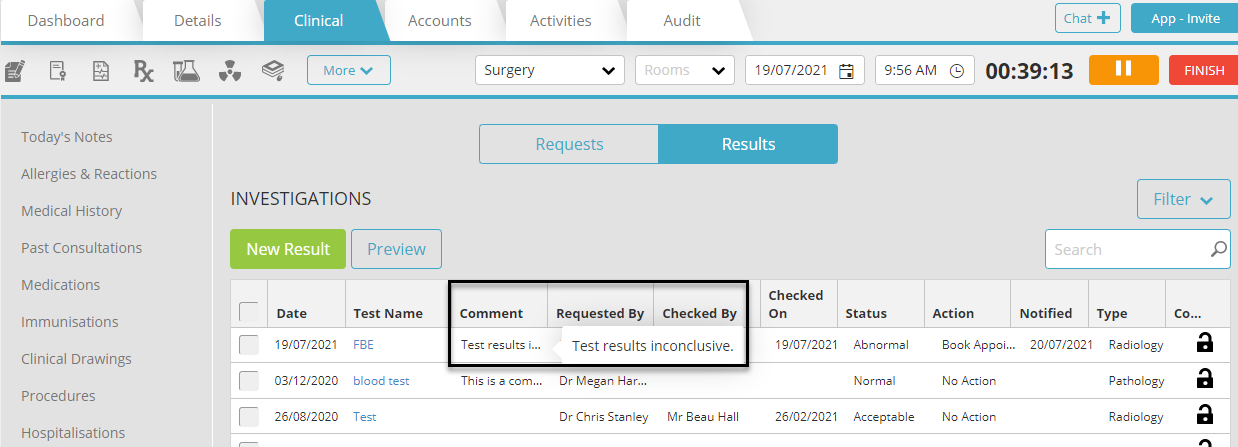
                Now when viewing the Investigations grid, you may see any Comments that have been added to a result item. A preview of the comments will be displayed where space allows, and hovering over the preview will show the entire comment.


                My Health Record Fields Added to Encounter Form

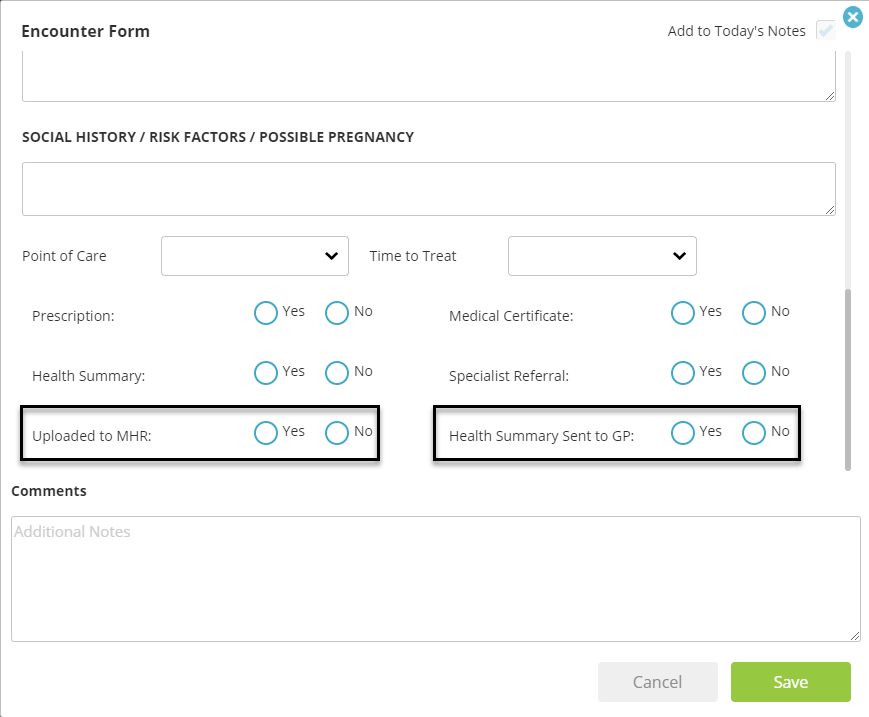
                Checkboxes have been added to the Encounter Form, for “Uploaded to My Health Record”, and “Health Summary Sent to GP”, for practices using My Health Record functionality.


                Activities Filter Change

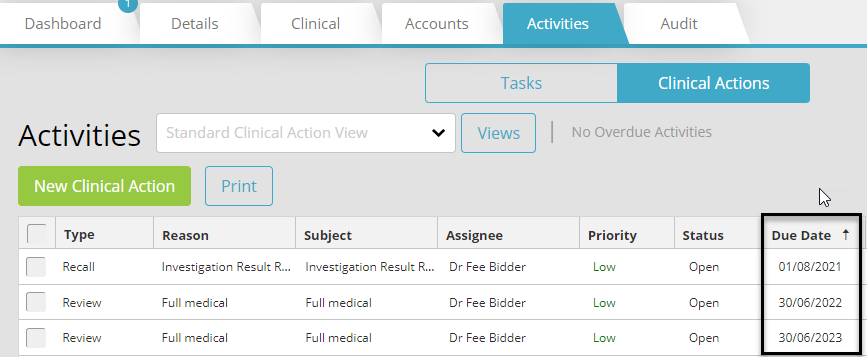
                Activities will now be ordered by earliest due date first in both the patient record and within the Activities/Tasks window, to improve the prioritisation of Activities.


                New Print Letter Button Location within Letter Editor

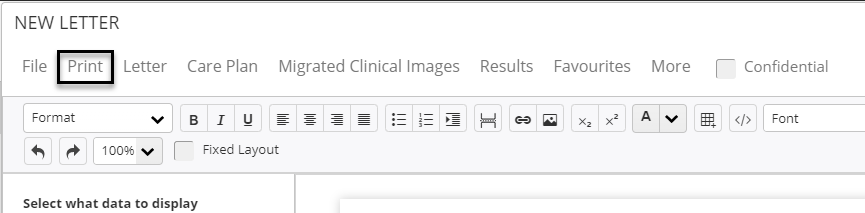
                The Print button has been moved from within the More menu, to it’s own button above the letter, to improve the speed of printing letters.


                Fee Schedule Updates

                The following fund schedules have been successfully uploaded into Medirecords, and are available immediately. 

                • AHSA
                • BUPA
                • BUPA Diagnostic
                • DVA
                • HBF
                • Medibank Private
                • Mildura Health
                • NIB
                • St Luke’s

                These changes have come about from customers like you, who have given us their feedback.  MediRecords is committed to continuous improvement to allow for ease of use of our product.

                See you next month for more exciting new features and functions within MediRecords.

                Fee Bidder - Headshot cropped

                Fee Bidder, Junior Product Owner

                Looking to stay updated with the latest from MediRecords?

                Sign up to the newsletter

                  MediRecords Product Update June 2021

                  MediRecords Product Update: June 2021

                  Fee Bidder - Headshot cropped

                  Fee Bidder, Junior Product Owner

                  See what we’ve been working on and released over the last month...

                  We are excited to announce the recent changes and updates we have released into the Medirecords product. Below you will find a summary of each of the changes we have made. 

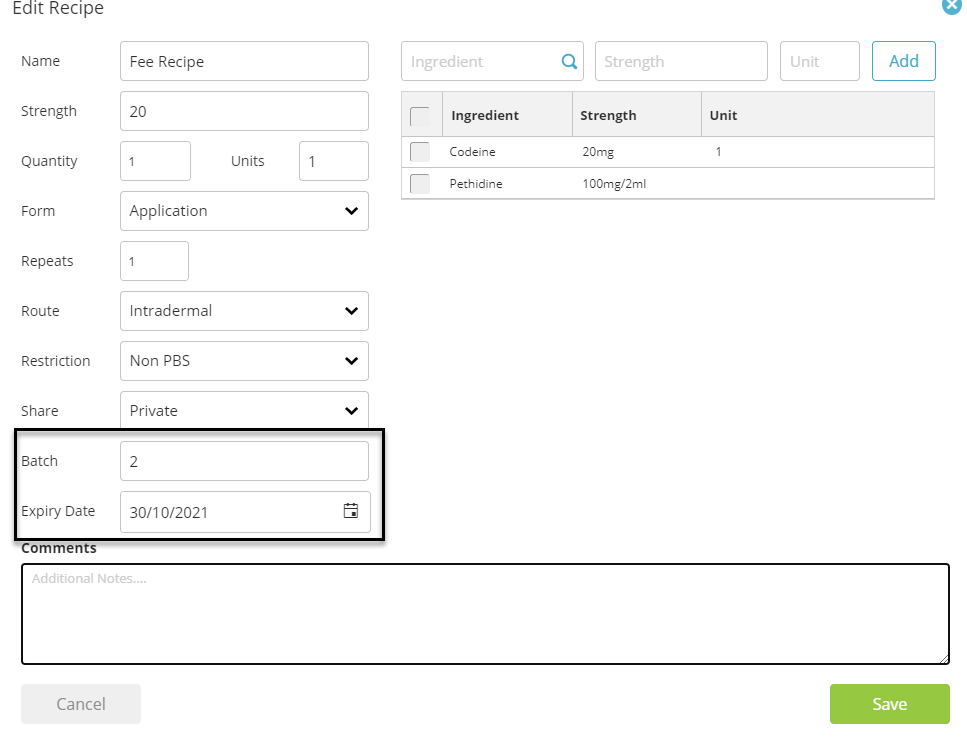
                  Batch and Expiry Fields Added to Custom Drug Recipes

                  When creating or editing a drug recipe, you may now add your own batch number and expiry. Once a drug has passed the expiry date set within the recipe, you will not be able to prescribe this drug again.


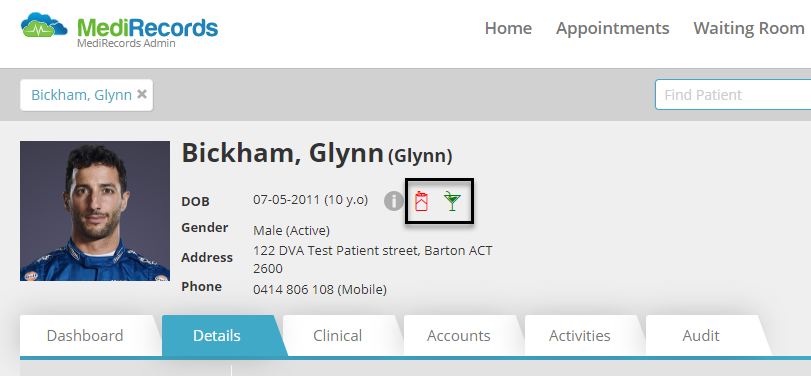
                  Alcohol and Smoking Indicators in Patient Screen

                  You may now review the alcohol and smoking status of a patient easily, due to 2 new icons added to the patient field. Provided a patient has their alcohol and smoking status recorded within the Tobacco and Alcohol sections of the patient file, these icons will be displayed beside the patient’s date of birth. Hovering over these icons will provide additional information.


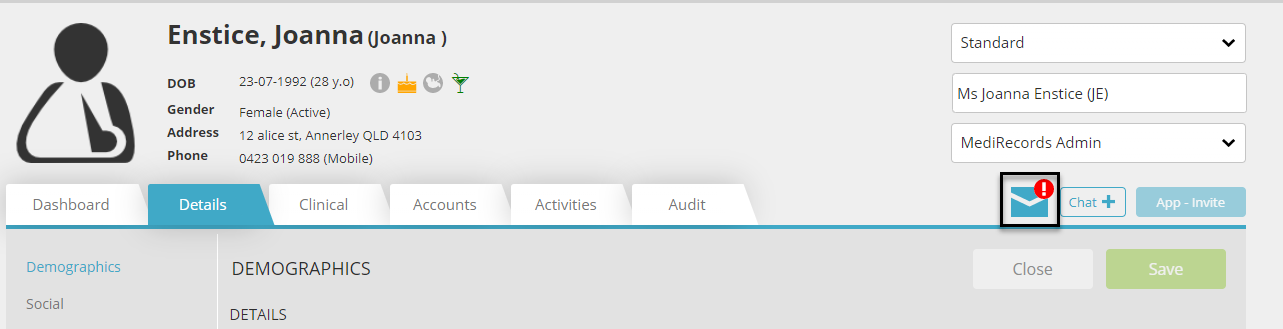
                  Unchecked Mail within Patient Record

                  Now when you click on the unchecked mail icon within the patient record, you will be directed to the appropriate result or secure message in question for quick review.


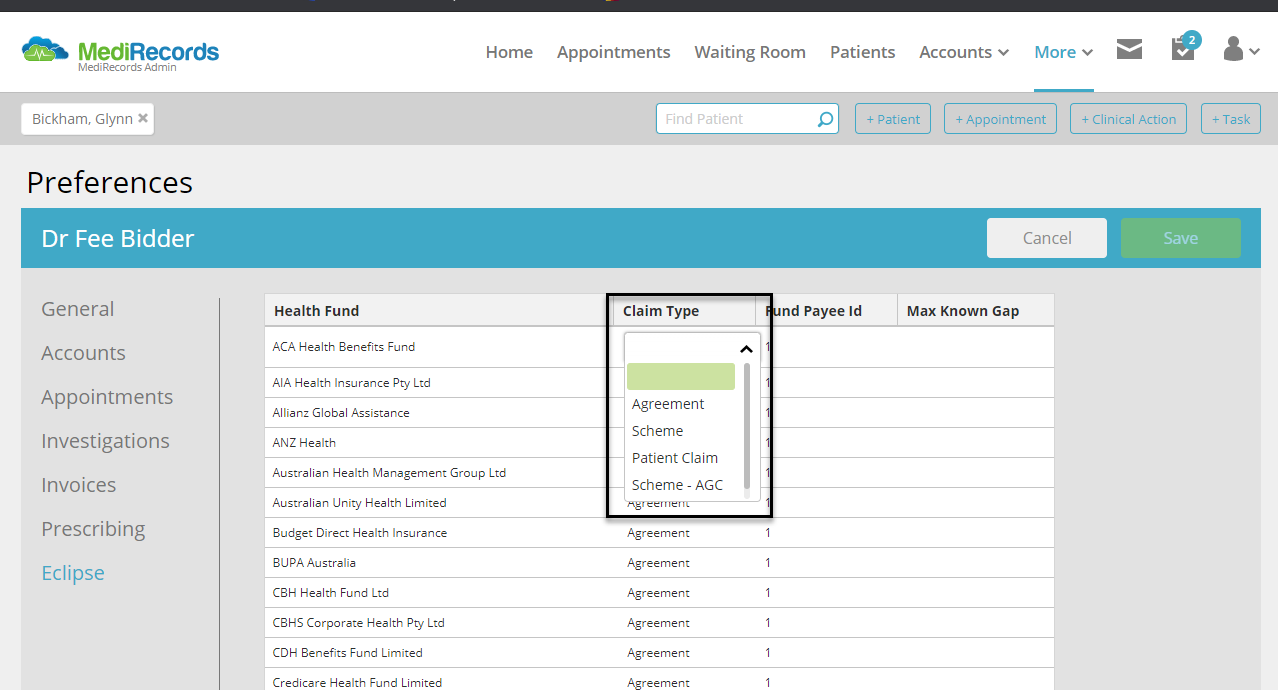
                  Additional Claim Type – Scheme – AGC (Access Gap Cover)

                  Scheme-AGC has been added as a default claim type within the ECLIPSE configuration window found within Preferences > ECLIPSE. More information on the Access Gap Cover claiming process can be found here: https://www.ahsa.com.au/web/doctors/agc


                  Medicare Benefits Schedule (MBS) July

                  During July, Medicare released a schedule containing a significant number of item number removals, modifications, and additional items. This has been successfully uploaded into Medirecords, and be used immediately. The majority of the changes were related to Telehealth, Cardiac & Orthopaedic item numbers. For more information on the MBS changes, please view the Medicare website.

                  These changes have come about from customers like you, who have given us their feedback.  MediRecords is committed to continuous improvement to allow for ease of use of our product.

                  See you next month for more exciting new features and functions within MediRecords.

                  Fee Bidder - Headshot cropped

                  Fee Bidder, Junior Product Owner

                  Looking to stay updated with the latest from MediRecords?

                  Sign up to the newsletter

                    MediRecords Product Update May 2021

                    Product Update May 2021

                    MediRecords Product Update: May 2021

                    Megan Harker

                    Megan Harker, Support Team Lead

                    See what we’ve been working on and released over the last few weeks...

                    Telehealth Appointments Now Supported by Appointment Widget

                    We’ve also introduced some changes to the way our Appointment Widget supports Telehealth Appointments.  These appointments can now be made online and the link for the appointment will be sent to the patient in their confirmation SMS. 
                    Please ensure your Telehealth appointments are configured correctly to appear on your website’s widget.  


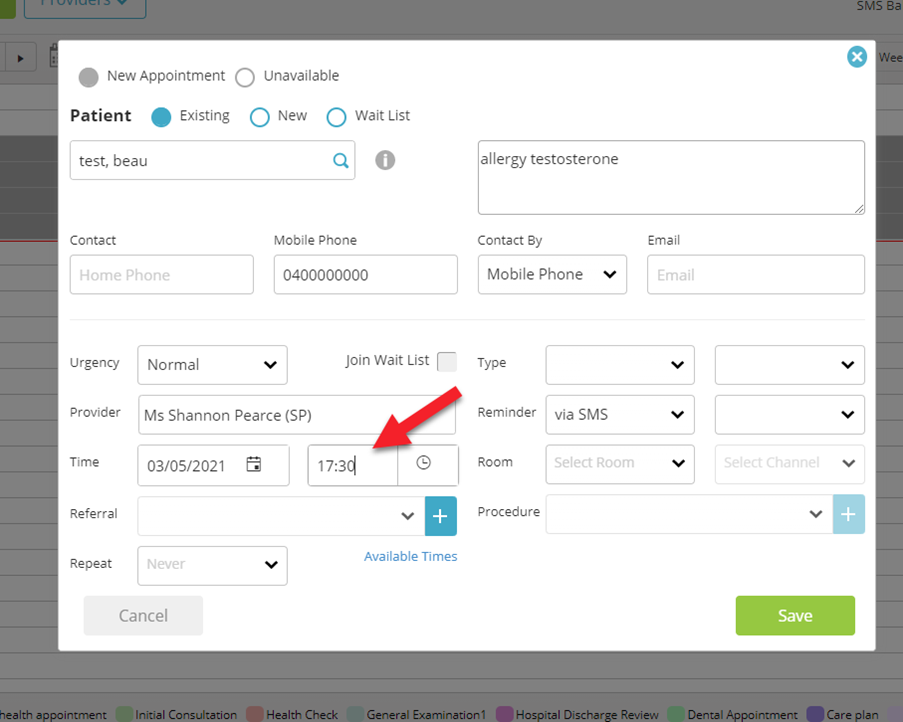
                    Free Text Start Time 

                    We’ve introduced the ability to free text appointment times when making or editing appointments.  The new function lets you type into the appointment time field more specific start times, and also allows you to use 24 hour time which then converts to an AM or PM time in the appointment book.  


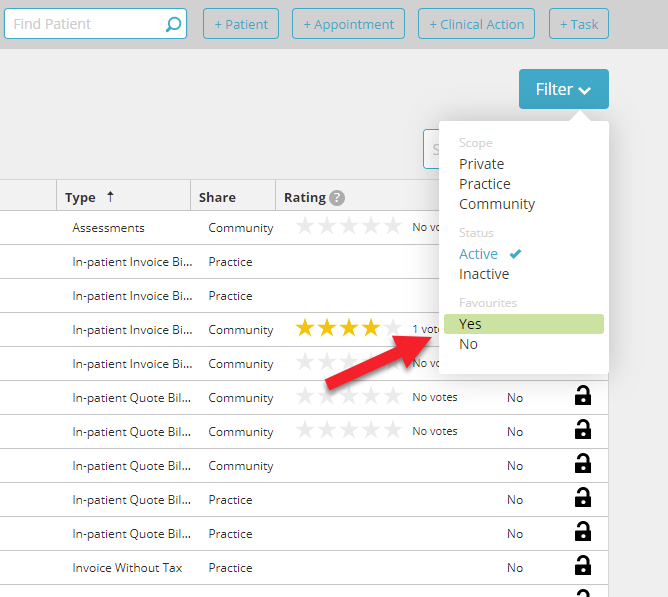
                    Filter Letters and Templates

                    You can now add a filter within the MediRecords Letter Templates search table to indicate that you want to search within your favourites.  This will allow you to create a search within only your preferred resources.


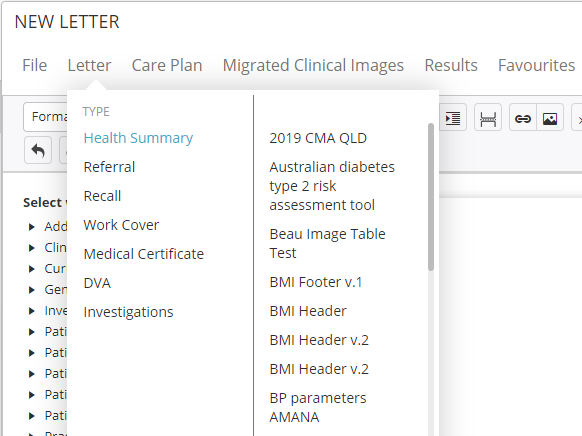
                    Resources are now Alphabetized

                    Letters and favourites are now alphabetized in the letter editor, meaning ease of use for our customers.

                    New Fields Added to Provider Billing Activity Reports

                    To allow for greater visibility, two new fields have been added to the Provider Billing Activity Report.  ADJ – which shows the amount of adjustments or write offs to the invoice and Outstanding which allows for more visibility of the amount outstanding on the invoice.

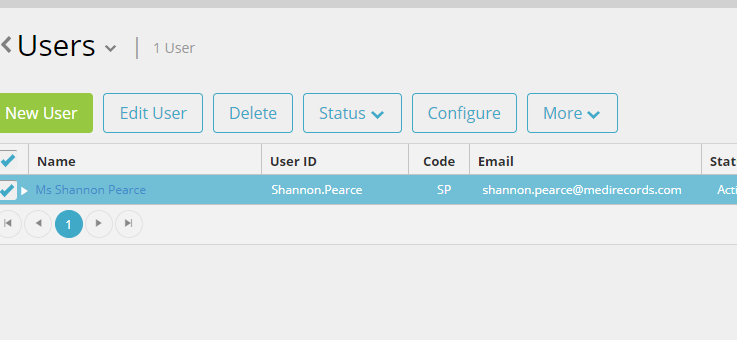
                    Configure Button Has Moved

                    We’ve recently moved the Configure option from the More menu to a button on the sub menu when setting up new users.  This will reduce the amount of clicks needed to configure new staff for practices.


                    Letter Writer Improvements

                    Several new fields have been added to the letter writer mail merge library including reason for visit, notes associated with medical conditions including current, past and selected, preferred name and all providers.


                    Patient Header 

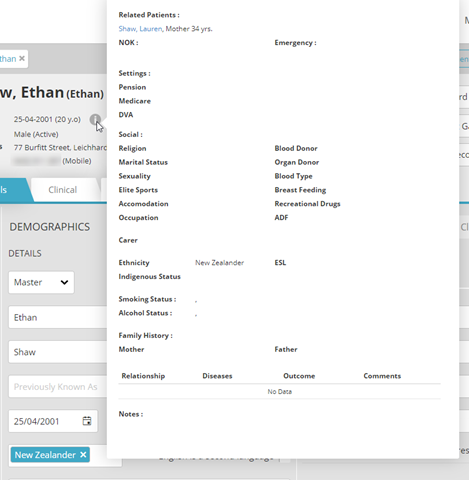
                    The hover state on the patient header is now shown in full without having to scroll up or down.

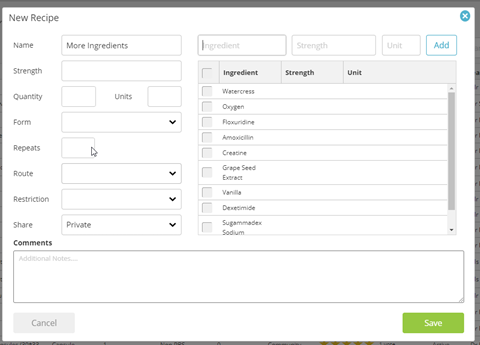
                    Drug Recipe

                    Your custom drug recipes now support more than 6 ingredients.

                    Unread Mail Indicator

                    On the patient record there is now an alert to show if this patient has any unread correspondence in any of the provider’s inboxes.  Click here to learn more.


                    Prescribing Approval Process

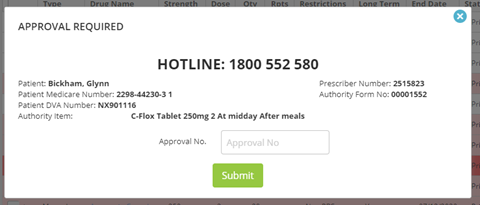
                    Prescribed authority prescriptions functionality has been improved with additional information now displayed on the approval screen including: Hotline Number, Patient Name, Patient Medicare Number, Patient DVA, Prescriber Number, Authority Form No and Authority item.

                    These changes have come about from customers like you, who have given us their feedback.  MediRecords is committed to continuous improvement to allow for ease of use of our product.

                    See you next month for more exciting new features and functions within MediRecords.

                    Megan Harker

                    Megan Harker, Support Team Lead

                    Looking to stay updated with the latest from MediRecords?

                    Sign up to the newsletter