
Pulse Check: When caring becomes dangerous

Frustrated patient yells at a practice receptionist, who looks down at her clipboard at the reception counter.

Pulse Check: When caring becomes dangerous

Frustrated patient yells at a practice receptionist, who looks down at her clipboard at the reception counter.
Tim Pegler - Author, Journalist and Senior Business Development Manager at MediRecords

This article is the first in a new monthly series penned by Tim. 

Aggro, everywhere 

If you sit in a Victorian hospital and listen to the loudspeaker announcements, you’ll often hear ‘Code Grey’. Codes can vary across Australian hospitals, but Code Grey often means an unarmed person or patient is being aggressive, abusive or threatening. If you hear ‘Code Black’, it likely means a person is armed and/or has escalated to physical violence. 

You may hear Code Grey more frequently than ‘Code Blue’, which signifies a medical emergency. That’s alarming in a hospital setting and a clear sign occupational violence and aggression is significant safety issue, with consequences for healthcare staff, patients and visitors. 

According to Australian Institute of Health and Welfare (AIHW) research, assault is now the second leading cause of hospitalisation for injuries among healthcare workers. Assault-related hospitalisations among healthcare workers rose from 49 in 2015–16 to 126 in 2024–25, rising from 4.3 to 8.1 per 100,000 healthcare workers. 

Receptionist wearing a headset holds her forehead in frustration while working at her computer in a busy clinic.

Primary care, primary causes

The issue isn’t restricted to hospitals. GP clinics also regularly face the ire of cranky clients, with receptionists often exposed as the first point of contact.

A 2025 British Medical Journal international review of studies of violence and abuse toward general practice staff (including six Australian studies) found past-year rates for violence and abuse by patients and the public towards GP clinic staff ranged from 14% to 90%, while career-long estimates were from 18% to 91%. Long wait times and unmet patient demands were the most common catalysts for aggressive behaviours.

This is a new consideration for clinics when it comes to training practice personnel. Practice managers and front of house staff don’t just need to be confident in using practice management software, they may also need training in deescalating and managing patient aggression.

The big picture

Healthcare isn’t unique. Aggression is rising in other workplaces, such as retail, education, the public service and all levels of politics. But if we need a signpost to where we don’t want to go, the US looms large. A review of media reports of shootings in American hospitals between 2000 and 2024 found an overall incidence of 25.2 hospital-based shootings per year. Between 2012 and 2024 shootings increased by 8.4% per year, with an estimated 81 fatalities. The study, published in JAMA Network Open, concluded hospitals represented, “an intersection between broader national trends in workplace and firearm violence”.

Australia has fewer guns but we can take nothing for granted as the tide of aggression rises.

Link of the Month

With all the talk of AI anarchy, it’s nice to see robots getting good press. 

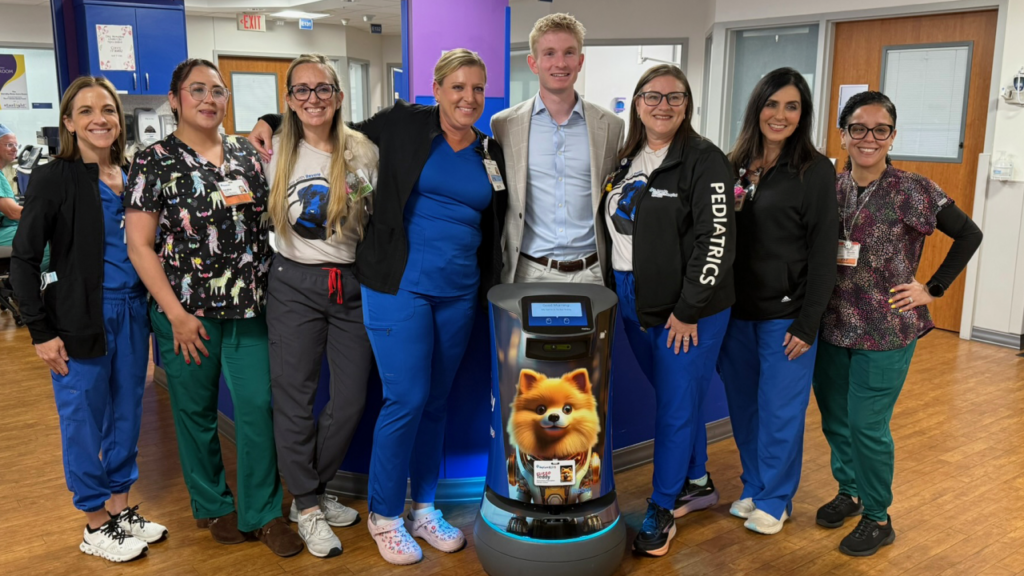
Australian hospitals already use robots for automated delivery of items such as linen; in this story a ‘robot dog’ couriers medications for paediatric patients. 

Anything that brings smiles to sick kids sounds like a winner to me.

Why FHIR Matters When Choosing Practice Management Software

Why FHIR Matters When Choosing Practice Management Software

A referral arrives through secure messaging. A team member opens the document, reads the details and types them into the patient record. Pathology results come from a different system, so they’re downloaded, attached and filed by hand. During a consultation, the AI scribe needs context from the record, so someone copies it across.

The information already exists digitally. The work is getting it from one system into another.

For one patient, that takes a few minutes. Across a busy practice, those minutes become hours of admin, with more chances for details to be mistyped or to go out of date. The fix is interoperability: software that can exchange and use each other’s data directly. FHIR is a shared set of rules for how health information is labelled and sent, so different software can understand each other. It’s becoming more common, and it’s worth understanding before you compare software.

This article covers how FHIR works, what it changes for a practice, and what to ask before you commit to a platform.

What is FHIR?

FHIR (Fast Healthcare Interoperability Resources, pronounced “fire”) is a standard from HL7, the international body that sets health data standards. It gives healthcare software a common way to structure and share data.

Think of it as a common language. It doesn’t automatically connect every system to every other, because systems still need to be set up to work together, including security, permissions and day-to-day workflows. But a shared standard reduces custom development and makes new connections more consistent.

Four ideas sit behind it.

Resources

FHIR splits healthcare information into standard types, called resources. Examples include a patient, an appointment, a prescription (MedicationRequest in FHIR), a test result or measurement (Observation) and a referral (ServiceRequest). Each type has a fixed set of fields, so every system knows where to find a date of birth or a medication.

APIs

An API is a set of rules that lets one piece of software ask another for information, or send it some. Think of it as a menu and ordering system: the rules tell one program exactly how to ask another for something. FHIR requests travel over the web, much like loading a web page, and the answer comes back as structured text that software can read easily. When an API is documented, a developer can see exactly how to ask for what they need.

Terminology

Two systems can share the same fields and still describe things differently. FHIR works alongside clinical codes to fix this. SNOMED CT-AU is Australia’s standard list of clinical codes. It gives each diagnosis, symptom or finding its own code, so “type 2 diabetes” recorded in one system is understood as the same condition in another.

Profiles

FHIR leaves room for choices, so each country publishes a local rulebook, called a profile, that says which fields to use and how. In Australia, AU Core is that common baseline. Sparked is the community that develops and tests FHIR for Australian healthcare.

What FHIR changes for a practice

The technical details matter, but the real question is what interoperability changes in day-to-day work. The examples below describe what’s possible when both ends of an exchange support FHIR.

Referrals

A referral bundles the patient’s details, the reason for referral, their history and supporting documents. FHIR gives each a standard label and place, so the receiving software can fill in the right parts of the record instead of relying on manual entry.

Example: Where the sender supports FHIR, a GP's referral arrives and your team opens a record that is already populated, then confirms the details.

Pathology and results

A PDF is like a photo of a page. Software can display it, but can’t reliably read the patient, test or value inside it. Structured formats solve this, and FHIR is one of them. It sends results as data that software can match automatically. (A single value, such as a haemoglobin level, is an Observation. A group of results forms a DiagnosticReport.)

Example: A blood test result arrives as structured data and is matched to the right patient and test. Staff step in only when the system can't make a true match.

Third-party tools

Telehealth, ePrescribing, AI tools and other applications each need some information from the patient record. A standard way for software to connect gives them a consistent, authorised way to request it, and the platform controls what each one can see. Because the connection method is standard, a new tool that supports the same FHIR standards may connect without a custom-built connection. That keeps your options open as your needs change, including for tools that don’t exist yet.

Example: An AI documentation tool requests only the patient context it is authorised to access, with no custom connection to build. Permissions and configuration are still needed, but the custom work shrinks.

Where the sector is today

FHIR is growing in importance in Australian healthcare, but many referrals, results and other exchanges still rely on older but widely used message formats, such as HL7 v2 and CDA. MediRecords connects with the secure messaging services HealthLink and Medical-Objects for these exchanges. Healthcare organisations and vendors work across several standards at once, so the practical position is a platform that works with the systems you rely on now and gives you a foundation for what comes next.

Why not every platform supports FHIR

Supporting FHIR takes more than adding another integration. A platform has to be built to store and share data in a consistent structure, with authentication, access controls and documented APIs behind it. Many established systems were designed around their own way of organising data, with connections added one at a time over the years. That approach works well for specific connections, but adding a shared standard to an older system means reworking how it stores and organises data. That is a large engineering project, and the vendor has to see enough demand to justify it. Platforms built more recently, or rebuilt around open APIs, often find this easier, though a newer platform isn’t automatically a better one.

That is why it is worth checking how a platform is built, not only what it lists.

What to check before you commit

Which FHIR resources are supported?

Can data be both read and written?

Is the API documented and accessible to developers?

Which Australian profiles or implementation guides are supported (for example, AU Core)?

Has the FHIR implementation been tested or conformance-checked, for example at a Sparked connectathon?

How are authentication and permissions handled?

Can third-party applications connect directly?

How much custom development is required for a new integration?

Does it also support HL7 v2 and CDA for the exchanges that still depend on them?

Are there fees for API access or third-party connections?

Can I export my data in a standard format if I leave?

Clear answers let you compare platforms on equal terms, and vague answers tell you something too. MediRecords publishes its API documentation, so you can test it against this list.

Where MediRecords fits

MediRecords is a cloud-based electronic health record (EHR) and practice management platform designed with interoperability in mind. It supports standard web-based connections (REST APIs) and FHIR, along with Australian standards including SNOMED CT-AU, and is a founding member of Sparked. Its connections cover the workflows where practices feel the most friction:

MediRecords use cases

Appointment booking APIs. A patient-first start.

Appointment Booking API

Patients book from your practice’s own website. They choose a service, see an estimated next opening and get a confirmation. Behind the scenes, the booking goes straight into MediRecords, so your team doesn’t have to re-type it.

This is an example of what a developer could build using the MediRecords appointment APIs, not a ready-made product. Times shown are estimates until the booking is confirmed.

Online patient forms that go into the record

Patient Forms API

New patients fill in their details online before their first visit, including an emergency contact. The details go straight into their MediRecords record, so your team doesn’t have to type them in. Referral letters can be uploaded too. They are saved in the patient’s Correspondence In folder, so nobody has to file them by hand. Referral letters can be uploaded too. They are saved in the patient’s Correspondence In folder, so nobody has to file them by hand.

This is an example of what a developer could build, not a ready-made product. Referral letters are saved as correspondence, not as referral records.

Frequently Asked Questions

What does FHIR stand for?

Fast Healthcare Interoperability Resources. It’s maintained by HL7, the international standards body for health data.

No. An API is the way one piece of software asks another for information. FHIR is the set of rules for what that information looks like and where each detail goes. FHIR is usually delivered through an API.

No. FHIR is about how data is structured and shared, not who can see it. Access is controlled by the platform, which verifies who is asking and limits what each application can see.

No. Vendors may support different types of information, different Australian rules, and different levels of reading and writing data. The checklist in the article helps you find out exactly what is supported.

It reduces the manual work of moving information between systems, and it makes it easier to add new tools later without custom-built connections.

Considering a move to MediRecords?

Choose your current system and enter your details into the form below. We’ll show your full migration breakdown, and if you’re ready to proceed, our team will be in touch with your timeframe.

Can't see your system? It can usually still move across. Reach out to our team to organise a sample data review.

What Happens To Your Data When Switching EHR Systems?

What Happens To Your Data When Switching EHR Systems?

You’ve decided it might be time for a software change. Then comes the question that stops most practice managers in their tracks: “what happens to all the data we’ve built up?” 

Patient demographics. Clinical notes going back a decade or more. Medication histories, allergies, referral letters, scanned documents: the accumulated record of every patient who has ever walked through your door.

For many practices, this is where the search for new software stalls. Not because the new system isn’t better, but because the data feels too risky to move.

Changing software doesn’t mean leaving your data behind, and it doesn’t mean starting again from a blank patient list. With the right preparation, the information your practice depends on can be assessed, prepared and carried across into a new system.

Data migration is a process, not a copy and paste

Data migration is the process of moving information out of your current software and into a new system. Depending on what your existing system holds, that can include patient demographics, clinical records, medications, allergies, immunisations, investigation results, correspondence, documents and referrals, along with other everyday practice data.

The complexity comes from something most practices never have a reason to think about: no two systems store information the same way. Practice software isn’t built to a single shared standard, so a field that’s a simple text entry in one system might be a structured, coded value in another. Even something as basic as an allergy list can be organised in completely different ways behind the scenes.

That’s not a flaw in any particular system. It’s the reality of an industry where different vendors have built things independently over many years. In practice, this means every field falls into one of three categories during a migration:

Fields that move straight across.

The data type exists in both systems in a comparable form, so it transfers with little to no restructuring.

Fields that move across but land somewhere different.

The information carries over, but because the two systems model it differently, it may sit in a different part of the patient record than you're used to.

Fields that need a closer look.

Some data types are specific enough to a vendor's system that they need a sample of your real data checked before anyone can confirm exactly how, or whether, they'll convert.

Knowing which of your data falls into which category before you commit is one of the most useful things a practice can ask for early on.

What can you expect at each stage of a data migration?

No two software providers run migration exactly the same way, but at MediRecords, it comes down to four stages: scope, authorise, transfer and test, then go live. A typical process may look something like:

Scope the migration

A good plan starts with the practical questions: what does your current system hold, what can it export, and are there oddities, like old scanned documents or unusual custom fields, that need special handling? Scoping is shaped around your practice, not treated as one size fits all.

Authorise the migration

Once requirements are understood, formal authorisation is typically required before anyone accesses your existing system or data. This is usually a consent style agreement that sets out exactly what's being moved and gives permission to access the source system. It's a short, straightforward step, but an important one, since it ensures everyone is clear about what's happening before it happens.

Transfer and prepare the data

Your data is exported and prepared in a test environment first, never straight into your live account. This is where the real differences between systems get sorted out, and where you get a clear picture of what's included and any limitations that apply.

Test, review and go live

Your data is checked against your source system, and any issues that come up are fixed before you see the results. Duplicate records can occur since new data is added alongside what's already there, which is why they're flagged in a clean up report for your team to work through. Once the test is clean, your team reviews it against a supplied checklist, and once you're happy, your records move into your live account and a start date is set.

Common data migration myths

“We’ll lose years of history.” Structured records, and often scanned documents and notes, are designed to carry across, not be left behind. Testing in a separate environment before going live is precisely to catch anything that hasn’t come through properly, so it can be fixed before your team ever relies on it.

“It’ll take months and disrupt everything.” Most migrations are measured in weeks, not months, and one handled properly shouldn’t require your practice to pause normal operations while it happens. New information is inserted alongside what’s already in your current system, rather than overwriting it, so there’s little risk to the records you’re actively using day to day. Your team can generally keep working in the old system right up until going live.

“Our team needs to understand databases to get through this.” None of the technical mapping is work your team needs to do. What’s asked of your practice is far more practical: confirming what data you want brought across, providing access to an export of your current system, and reviewing the results once they’re ready. The database level work sits with the migration team, not with practice staff.

What this means for your practice

No practice needs to manually move records or understand how databases work to get through a migration. What’s expected of you is straightforward: help define what matters, provide access to your data, answer a few questions about your current system, and review the results once they’re ready. Handled properly, the record you’ve built over years of patient care arrives intact in the system you’re moving to.

Curious what a move to MediRecords would actually look like for your practice? Check your system with our free interactive migration tool to see exactly what data can move across, where it will land, and which fields might need a closer look.

Frequently Asked Questions

How does data migration work with MediRecords specifically?

MediRecords migrates data from many of the major practice management systems used across Australia. If your current system isn’t a common one, a sample of your data can usually still be reviewed to confirm what’s possible. The process follows the same shape outlined above: scoping what needs to move, signing a short consent agreement, testing your data in a separate environment, and reviewing the results before anything goes live in your MediRecords account.

A few checks happen before anything reaches your live account. Your data is first moved into a test environment and reviewed against your existing system. Where a patient’s history exists in multiple records, the version with the longest, most complete history is the one brought across. Where the migration creates duplicates, a clean up report is shared with your team so you know exactly what to review.

Most migrations are measured in weeks, not months. The exact timeline depends on which system you’re moving from, how much data you have, and how complex your records are.

Not every field converts the same way between systems, since no two platforms store information identically. Some data moves straight across, some lands in a different part of the record, and some needs a closer look at a sample of your actual data before anyone can confirm how it’ll convert.

Any reputable migration process takes steps to keep your data secure throughout, including during testing. Ask your provider directly how they handle this if it’s not covered in what they’ve shared with you upfront.

Considering a move to MediRecords?

Choose your current system and enter your details into the form below. We’ll show your full migration breakdown, and if you’re ready to proceed, our team will be in touch with your timeframe.

Can't see your system? It can usually still move across. Reach out to our team to organise a sample data review.

RBA Card Surcharge Ban 2026: What It Means for Your Practice

RBA Card Surcharge Ban 2026: What It Means for Your Practice

From 1 October 2026, the way Australian businesses accept card payments is changing, and healthcare practices are no exception. 

As part of the Reserve Bank of Australia’s (RBA) biggest payments overhaul in two decades, card surcharging will no longer be permitted, meaning practices won’t be able to add a separate fee when a patient chooses to pay by card.

The cost of accepting card payments isn’t disappearing, though. Payment providers will keep charging businesses to process transactions, so if your practice currently surcharges, now is the time to understand what the change means for your fees, your systems and your patients.

Why the RBA is scrapping surcharging

Surcharging was introduced more than two decades ago, when cash was still the norm, to make the extra cost of paying by card visible so customers could choose a cheaper option. That logic doesn’t hold up today: card payments are now the default for most Australians, including patients at healthcare practices. The RBA has concluded that surcharging no longer steers people toward cheaper payment choices and mostly just adds confusion at the point of payment, so it’s being removed.

What's changing from 1 October 2026

The surcharge ban applies to payments made using eftpos, Mastercard and Visa. American Express has also announced it will remove surcharging from the same date.

Your payment provider will continue to charge a processing fee on every card transaction regardless. That means most practices will need to think about how these costs fit into their overall pricing, rather than passing them on at the point of sale.

Key takeaways

Card surcharging on eftpos, Mastercard, Visa (and Amex, voluntarily) ends on 1 October 2026.

Processing fees still apply; they just can't be passed on as a separate surcharge.

The interchange fee cap is also dropping (roughly 0.8% to 0.3%), which may modestly lower costs, though savings aren't guaranteed to be passed on.

Review your fee structure, payment settings and patient-facing materials before the deadline.

MediRecords/Stripe customers who don't act will have surcharging switched off automatically from 1 October.

Discounts for specific payment methods are still allowed, provided they're genuinely structured and communicated as discounts.

What the surcharge ban means for healthcare practices

It’s an opportunity to review how your practice manages payment costs more broadly. Before 1 October 2026, here’s what’s worth reviewing:

Check your surcharge settings

Find out whether your practice currently applies a card surcharge, and where.

Review your card processing fees

Understand exactly what you currently pay your payment provider to process card transactions.

Review your fee structure

Consider whether your current fees still work for your practice once card processing costs can no longer be passed on as a surcharge.

Update patient-facing information

Check your website, booking systems and other patient materials for references to card surcharges that will need to be removed or updated.

There’s no requirement to increase your fees. Every practice’s costs are different, so it’s worth deciding what approach makes sense for yours.

If you do decide to build card processing costs into your fees, the simplest approach is usually to fold it into your regular annual fee review, factoring in your typical card-to-cash payment split. When communicating any increase, a simple message about your annual review is usually enough; there’s no need to mention card processing costs specifically.

Understanding card processing costs

Previously, practices could recover some or all of their processing fee through a surcharge. From 1 October 2026, that option disappears, so the cost needs to be built into your overall pricing strategy instead.

This is partly offset by another change in the same reform: the RBA is lowering the cap on interchange fees (the portion of a transaction fee that goes to the patient’s bank), from roughly 0.8% to 0.3% on standard credit cards. Stripe has also announced lower domestic pricing from the same date. In theory these should reduce processing costs over time, but providers aren’t obligated to pass savings on in full, so it’s worth treating any reduction as a bonus rather than something to plan around.

Using Stripe with MediRecords?
Here's what to do

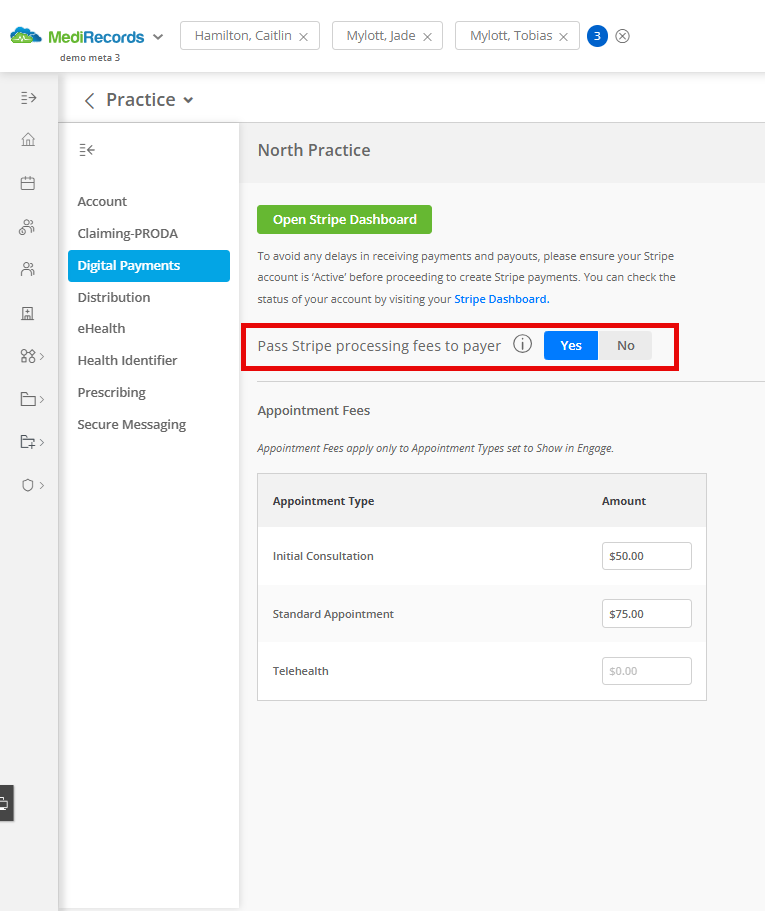
If your practice processes payments through Stripe via MediRecords and currently applies a card surcharge, you’ll need to update your settings before 1 October 2026.

1. Turn off your surcharge

Go to Practice and User Configurations > Digital Payments and set the Surcharge toggle to No.

2. Review your fee structure

Consider whether your practice fees need adjusting to account for card processing costs that can no longer be surcharged.

What if you don’t update your settings? MediRecords will automatically switch off surcharging for Stripe customers from 1 October 2026 and remove the surcharge option entirely. Stripe processing fees will still apply to your practice regardless.

Other payment changes worth considering

The surcharge ban only targets fees added specifically because a patient chooses to pay by card. Other ways of structuring fees and payments aren’t affected in the same way.

Discounts

The new rules don’t prevent practices from offering a discount for a particular payment method, for example, a lower fee for patients who pay by direct deposit. If your practice currently varies its prices depending on how a patient pays, it’s worth reviewing that structure before October to make sure it’s presented and communicated as a genuine discount, not a disguised card surcharge.

Online and telehealth payments

The ban applies to card payments made online just as much as in person, including booking deposits, outstanding account payments and telehealth consultations. Check how surcharges are currently applied across these touchpoints and make sure your settings are ready.

Frequently Asked Questions

When does the card surcharge ban start in Australia?

From 1 October 2026, card surcharging will no longer be permitted in Australia for eftpos, Mastercard and Visa payments. American Express has also announced it will remove surcharging from the same date.

Yes. Payment providers will continue to charge businesses a processing fee on every card transaction; only the ability to pass that fee on to the customer as a separate surcharge is being removed.

Partly. As part of the same reform, the RBA is lowering the cap on interchange fees from roughly 0.8% to 0.3% on standard credit cards, and Stripe has announced lower domestic pricing from 1 October 2026. Any savings aren’t guaranteed to be passed on in full, so it’s worth treating this as a possible bonus rather than something to plan around.

Yes. It applies to card payments made online in the same way as those made in person, including payment links, booking deposits, outstanding account payments and telehealth consultations.

If patients have no out-of-pocket cost, surcharging generally hasn’t been relevant to you. This mostly affects practices charging gap or private fees where a surcharge is currently applied at the point of payment.

Check whether your practice currently applies a card surcharge, review what you pay in processing fees, and decide whether your fee structure needs adjusting once surcharging is no longer an option. It’s also worth updating any patient-facing references to surcharges on your website or booking materials.

If your practice surcharges through Stripe via MediRecords, turn off the surcharge toggle under Practice and User Configurations > Digital Payments before 1 October 2026. If you don’t, MediRecords will switch it off automatically from that date, though Stripe processing fees will still apply.

Considering a move to MediRecords?

Choose your current system and enter your details into the form below. We’ll show your full migration breakdown, and if you’re ready to proceed, our team will be in touch with your timeframe.

Can't see your system? It can usually still move across. Reach out to our team to organise a sample data review.

Reducing The Cost of Admin in Australian General Practice

Reducing The Cost of Admin in Australian General Practice

“I get home an hour early every day.”

That line belongs to an Australian GP describing what an AI tool changed about her working day. Admin is usually costed in minutes – a few lost per consultation, tallied up at day’s end into an operational inconvenience. That accounting is comfortable, since it keeps the issue small enough to live with, but three studies published across 2025 and early 2026 – one from the American Medical Association, one a survey of general practitioners in the United Kingdom, and the Australian focus groups already quoted above – suggest the real figure sits differently. 

Across all three, documentation is the task doctors nominate most often for automation, ahead of diagnostic support, referral drafting and patient communication combined.

Where the burden concentrates

The American Medical Association’s 2024 survey of nearly 1,200 physicians found that 57% named reducing administrative burden through automation as the single biggest opportunity AI offered them, ahead of diagnostic accuracy and personalised treatment. 

Actual use nearly doubled over the same period – 66% of physicians reported using AI in 2024, up from 38% the year before, a rise of 78% in twelve months. Asked what they used it for, physicians pointed to documentation more than anything else too, with use of AI for billing codes, charts and visit notes rising from 13 to 21% of physicians in a single year, the fastest-growing application in the survey.

The same pattern holds in the United Kingdom, where Charlotte Blease and colleagues’ 2025 survey of 1,005 general practitioners, published in Digital Health, found that 25% now use generative AI in clinical practice, and that among those users, 35% applied it to documentation after patient appointments – the largest single use case, ahead of differential diagnosis (27%), treatment options (24%) and referrals (24%). 

A whopping 71% of those users said that the AI tools reduced their overall workload. 

“Physicians are increasingly intrigued by the assistive role of health AI and the potential of AI-enable tools to reduce administrative burdens, enhance diagnostic accuracy, and personalise treatments.”

The knowledge gap outranks the fear of error

Adoption remains fairly uneven, and Australian research by CSIRO and Avant Mutual shows why. Asked what stopped them from using AI, or what still concerned them as existing users, doctors in both Sydney and Melbourne ranked not knowing enough about how the technology worked or where their patients’ data went above every other issue, including the risk of the software producing an outright error. 93.3% of users and 94.4% of non-users raised it, ahead of AI error itself at 86.7% and 83.3% per cent respectively. 

A doctor who had adopted the technology, asked the same question, admitted she had never been told the answer either. “I can’t say exactly how it works, because no one’s told me.” 

The knowledge gap, on both sides of the divide, is not a training deficiency sitting at the margins of the job. It sits at the centre of whether a doctor can use the tool with a straight face.

“If patients ask me, is the data encrypted, where's it stored, is it in Australia or overseas, I don't have the confidence to say yes, this, this and this. And if I don't have that confidence, they'll look at me and say, well, can I trust your advice then.”

Nor is that deficit evenly distributed. In the UK survey, 95% of GenAI users had received no formal training from their employer, and 85% said their employer had not even encouraged them to use the tools they were already relying on. The Australian focus groups found the gap bites hardest for doctors in small or solo practices, who have to select and assess AI software themselves, against doctors in larger organisations with an IT department to do that research for them. 

When vetting AI tools, who carries the risk?

Doctors with an IT department behind them are better placed than most, but they are not fully insulated from this cost either, since institutional support of that kind usually buys due diligence on one additional piece of software rather than the removal of the category of work altogether.

An AI tool bought as a separate product, however well built, still asks someone in the practice to vet it as a new piece of software before it can be trusted with a patient record. Software that reads or writes the note as a function already sitting inside the system a doctor uses, by contrast, removes that requirement at the point it would otherwise arise, since the practice assessed the record system’s governance once, when it adopted it.

None of this is particular to documentation, either. The same calculation applies to whichever category of AI a practice adopts next, whether that is filing incoming correspondence, summarising a patient’s history before an appointment, or something not yet built.

The object being processed changes but the underlying question does not. A capability bought from the vendor that already holds the record answers that question before it is asked. A capability bought from anyone else asks it again.

MediRecords’ two AI tools to date, Evolve Direct and Evolve Patient Summary, are built on that logic rather than around it. 

Evolve Direct files incoming correspondence, referral letters and results into the right patient record automatically, without the documents ever leaving the practice’s own MediRecords environment, and is credited with saving up to two hours a day on that category of admin alone. Evolve Patient Summary works the other side of the same problem, generating a summary of a patient’s last three consultations, recent correspondence and investigations within seconds, so a doctor opening a file before an appointment is not the one doing the collating. 

Neither asked a practice to onboard a separate vendor, since both run inside the record the practice had already assessed when it adopted MediRecords in the first place.

The pattern beyond documentation

Each new category of clinical AI will keep arriving promising time saved, and each time, what decides whether the promise holds is not what the software can do but where responsibility for vetting it sits once deployed. A practice that treats every new AI capability as a fresh procurement decision, weighed against a new vendor’s claims about security and data handling, pays that vetting cost again for each one. A practice that expects its record system to extend natively, function by function, pays it once. The saving the AMA and Blease surveys measured, and the hour the general practitioner quoted at the outset got back, hold only under the second model. Otherwise the burden changes shape, from typing to due diligence, without shrinking.

Rather than take the argument above on faith, the more useful test is a practical one. For the next piece of AI a practice is weighing up, ask whether it sits inside a system already vetted, or asks the practice to start that process again from a new vendor.

Nor is that deficit evenly distributed. In the UK survey, 95% of GenAI users had received no formal training from their employer, and 85% said their employer had not even encouraged them to use the tools they were already relying on. The CSIRO focus groups found the gap bites hardest for doctors in small or solo practices, who have to select and assess AI software themselves, against doctors in larger organisations with an IT department to do that research for them. 

Sources

Considering a move to MediRecords?

Choose your current system and enter your details into the form below. We’ll show your full migration breakdown, and if you’re ready to proceed, our team will be in touch with your timeframe.

Can't see your system? It can usually still move across. Reach out to our team to organise a sample data review.

Cloud vs On-Premise Practice Management Software

Cloud vs On-Premise Practice Management Software

Choosing the right practice management software involves more than comparing features like appointments, clinical records, billing and integrations. One of the most important decisions is understanding how the software is built, accessed and maintained.

Practice management systems generally fall into two categories: on-premise software, managed by the practice or its IT provider, and cloud-native software, designed to operate through secure online infrastructure.

This article compares cloud and on-premise practice management software, covering infrastructure, costs, security, telehealth capabilities and the key considerations when choosing the right solution for your practice.

What is the difference between cloud and on-premise practice management software?

On-premise practice management software is installed on servers located within the practice or managed by an external IT provider. The practice is responsible for maintaining the technology behind the system, including hardware, backups, updates, security and troubleshooting.

Cloud practice management software enables authorised users to access patient information securely from anywhere, making it easier to support multi-site teams, telehealth services, electronic prescribing workflows, and hybrid models of care.

The difference is more than simply where data is stored. It impacts how easily a practice can scale, support remote work, introduce new technology and manage the day-to-day responsibilities of running a system.

Some traditional practice management systems were originally built for local servers and later adapted for cloud access. Cloud-native platforms, such as MediRecords, are designed around cloud technology from the beginning, allowing practices to benefit from infrastructure built specifically for secure online access.

Cloud practice management software vs on-premise software comparison

Feature Cloud practice management software On-premise practice management software
Infrastructure costs
lower upfront hardware requirements
Requires investment in local servers and hardware
Server maintenance
Managed by the software provider
Managed by the practice or IT provider
Access
Secure access from anywhere
Usually limited to locations with local infrastructure
Software updates
Delivered automatically
Often requires manual installation
Scaling
Easier to add additional users, providers and locations
May require additional hardware and configuration
Telehealth support
Designed to support connected, remote workflows
May require additional setup and integrations
IT requirements
Less reliance on internal IT expertise
Greater responsibility for managing technology

The true cost of practice management software

When comparing software options, it is easy to focus only on subscription fees or licence costs. However, the true cost of a system includes the technology, time and resources required to keep it running.

On-premise systems often require additional investment in areas such as:

These costs can add up over time and are not always considered when practices first compare software options. Based on a five-year cost comparison, moving to cloud practice management software, such as MediRecords, could save organisations up to $216,900 (approximately $43,380 annually), representing a 64% reduction in total cost of ownership (TCO) compared with an on-premise system.

For smaller practices, these additional responsibilities can create unnecessary complexity and cost. Whether you’re a GP practice, specialist clinic or allied health practice, a cloud-based solution allows you to get started quickly without purchasing servers, managing infrastructure or coordinating ongoing IT support.

Cloud practice management software reduces many of these barriers by providing access to the system through a secure online environment, helping practices focus on delivering care rather than managing technology.

Understand the potential value for your practice

Explore the potential cost savings and benefits of moving to cloud practice management software with our ROI and pricing calculator.

Is cloud practice management software secure?

Security is one of the most common considerations when choosing cloud-based software.

A common misconception is that storing data on a local server automatically provides greater protection. In reality, security depends on how systems are designed, maintained and monitored.

Australian healthcare practices must protect personal and health information in line with the Privacy Act 1988 and guidance from the Office of the Australian Information Commissioner (OAIC). Cloud-native practice management software supports these requirements through secure infrastructure, controlled access, regular updates and ongoing monitoring managed by specialist technology teams.

With on-premise systems, practices are responsible for security updates, backups, access controls and disaster recovery. Cloud-native healthcare software allows these responsibilities to be managed by specialist technology teams, helping practices maintain strong security processes without requiring extensive internal IT knowledge.

This gives practice owners greater peace of mind, knowing critical infrastructure and security are managed by specialist technology teams.

Supporting modern healthcare workflows

Healthcare is becoming increasingly connected, with clinicians working across multiple locations and patients expecting more flexible care options.

Cloud practice management software enables authorised users to access patient information securely from anywhere, making it easier to support multi-site teams, telehealth services and hybrid models of care.

See how healthcare organisations are using cloud technology to support flexible care delivery, with examples from our customer case studies.

Benefits of cloud practice management software for growing practices

Whether you’re starting a new practice or expanding an existing one, cloud practice management software makes it easier to grow without investing in servers or complex infrastructure. Solo practitioners can get started faster with lower upfront costs, while larger practices can easily add users, providers and locations as they expand.

This allows practices to adopt connected tools such as patient communication, online bookings and other digital health capabilities without the complexity of managing additional local infrastructure.

Ready to move your practice to the cloud?

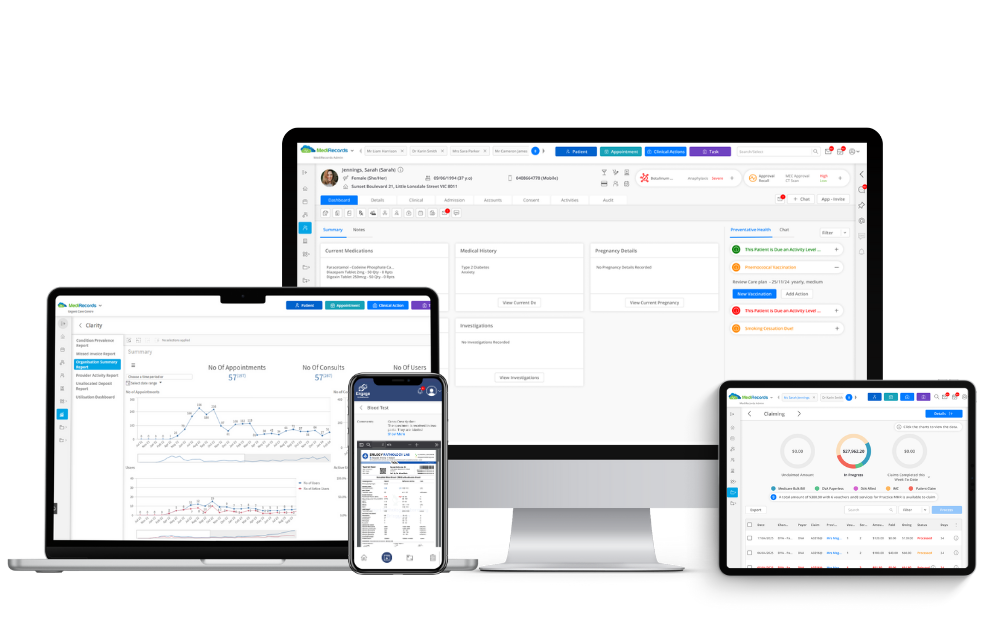
MediRecords is cloud-native practice management software designed for Australian healthcare practices, bringing appointments, clinical records, ePrescribing, billing, telehealth and patient communication ( via Engage) together in one connected platform.

Whether you’re a solo practitioner starting a new practice or a growing organisation looking to simplify operations, MediRecords provides the flexibility, security and scalability to support the way modern healthcare teams work. Our data migration process helps practices transition smoothly from their existing system, making the move to MediRecords simple and supported. Learn more about our data migration process here. 

Frequently Asked Questions

What is cloud practice management software?

Cloud practice management software is hosted online rather than installed on local servers. It allows healthcare practices to securely access appointments, clinical records, billing and other workflows while the software provider manages infrastructure, updates and maintenance.

Cloud practice management software is hosted online and managed by the software provider, while on-premise software is installed on local servers managed by the practice or its IT provider. The main differences include infrastructure costs, maintenance responsibilities, accessibility and scalability.

Yes, cloud practice management software can provide strong security when built and managed correctly. Cloud providers typically manage infrastructure, security updates, monitoring and backups, reducing the technology burden on practices.

Yes. Cloud-based practice management software supports connected healthcare workflows by enabling secure access to patient information, digital communication tools and telehealth services from different locations.

Yes. Cloud software can be a practical option for solo practitioners because it reduces upfront technology costs and removes the need to purchase servers or manage complex IT infrastructure when starting a practice.

No. One of the key benefits of cloud practice management software is that the provider manages much of the underlying technology, including hosting, updates and infrastructure. This allows practice owners and GPs to focus on running their practice rather than managing IT systems.

The cost of cloud practice management software depends on factors such as practice size, users, features and requirements. When comparing options, practices should consider the total cost of ownership, including hardware, maintenance, IT support and upgrades. Access our online pricing calculator here. 

Cloud practice management software can typically be implemented faster than on-premise systems because practices do not need to purchase or configure servers and supporting infrastructure before getting started.

Check what moves across from your system, and how it looks in MediRecords

Choose your current system and enter your details into the form below. We’ll show your full migration breakdown, and if you’re ready to proceed, our team will be in touch with your timeframe.

Can't see your system? It can usually still move across. Reach out to our team to organise a sample data review.

Changes to the upcoming Medicare Assignment of Benefit rules

Changes to the upcoming Medicare Assignment of Benefit rules

On 18 June, after sustained advocacy from the Royal Australian College of General Practitioners, the Federal Government softened the Medicare Assignment of Benefit changes due to start on 1 July.

What the announcement changes

The requirement underneath has not gone away

The concessions give practices room to move, yet they sit around the obligation rather than removing it. Consent still has to be captured at the point of claiming, recorded against the claim, and held for two years for whenever a patient or an auditor asks for it. That work happens every day. The only open question is whether the software does it or the front desk does.

This matters because the burden the College fought to reduce is, in practice, an administrative one. When software does not absorb a change, the practice absorbs the labour, and the RACGP 2025 Health of the Nation report found 70% of GPs are already concerned about their administrative workload. A change handled by hand lands straight on top of that.

Cloud-native software removes the burden, not just softens it

The deciding factor is how updates reach the system. Legacy software sits on a server in the practice, so each rule change arrives as a release to wait for, install, and test before it can be relied on. Cloud-native software is updated continuously, so the Medicare Assignment of Benefit changes can be built into the workflow ahead of the deadline and switched on for everyone at once, with no server visit and no version left languishing in a back room.

That is the difference between softening the burden and never carrying it. MediRecords is cloud-native, and the 1 July requirements are already built into the billing workflow, so digital consent is captured at the point of claiming and retained automatically for two years. When the rules shift, there is nothing for the practice to install and nothing to rework.

This is just one deadline, and there will be others. The figure worth weighing is not this month’s licence fee but what every future change will cost in hours, in risk, and in rejected claims. On a legacy system that bill keeps arriving, but on a platform built to update itself, it does not.

How we are supporting MediRecords customers

For practices already on MediRecords, the updated Assignment of Benefit tools will be available in the platform on 1 July, ready to use from day one. With the 12 month transition period in place, customers have time to get comfortable with the new workflow well before compliance begins. 

As more detail of the Medicare Assignment of Benefit changes emerges, we will keep updating the platform to match, so the work of staying compliant stays with us rather than landing on your front desk.

See it for yourself before 1 July.

The clearest way to judge whether a system is ready for the Medicare Assignment of Benefit changes is to watch one that already is.

For an obligation-free MediRecords demo, simply reach out to our friendly team via the form below. 

Assignment of Benefit changes: What it means for practices

Assignment of Benefit changes: What it means for practices

Healthcare in Australia is becoming increasingly digital, but many administrative processes have struggled to keep pace. Behind the scenes of every consultation sits a system that relies heavily on trust. Patients expect their information to be handled securely and their Medicare billing to be managed correctly.

From 1 July 2026, this system is being updated. Changes to the Medicare Assignment of Benefits (AoB) process will reshape how bulk billing consent is captured and stored in practices. While framed as a Medicare compliance update, the AoB changes also signal a broader shift toward more transparent, consistent, and digitally enabled healthcare administration in Australia.

For many practices, the Medicare AoB changes 2026 will feel like another layer of administration at first. But beneath that sits a clear path away from paper-based workflows and toward simpler, digital consent processes.

What are the Medicare Assignment of Benefits (AoB) changes?

The Department of Health, Disability and Ageing (DoHDA) is modernising Medicare billing for bulk billed and simplified billing services through amendments to the Health Insurance Act 1973. At its core, bulk billing still requires patient agreement to assign their Medicare benefit to the provider, with that benefit treated as full payment for the service.

The Assignment of Benefits (AoB) process sets out how this consent is captured. From July 2026, updated Medicare AoB requirements will change how bulk billing consent is documented, stored, and verified.

Key changes from July 2026 include:

  • Verbal consent will no longer be accepted, including for telehealth services.
  • Consent can be given before or after a service, but must be in place before a Medicare claim is submitted.
  • Approved or prescribed forms will no longer be required if all mandatory information is included.
  • Practitioner signatures will no longer be required.
  • Patient or authorised representative consent must be identifiable and electronically verifiable.
  • AoB records must be retained for at least two years and provided to patients on request.

Why Medicare is moving beyond paper consent

For years, consent for bulk billed Medicare services has been managed through paper-based forms and manual administrative processes. While these approaches have been long established, they are increasingly being complemented by more efficient digital workflows.

As healthcare delivery becomes more digitally enabled, paper-based processes can add avoidable steps such as printing, scanning, filing, and physical storage. They may also make it more difficult to consistently access or verify consent records when required.

The Medicare AoB changes aim to bring consent processes in line with modern digital health standards. By improving how consent is recorded and stored, the updates support clearer documentation, stronger governance, and more reliable access to records across the system.

What this means for your practice

For practices, the Medicare AoB changes will require planning, including updates to systems, workflows, and staff training to support consistent and compliant consent capture.

While this creates short-term adjustment, it also presents an opportunity to improve how consent is managed. Embedding consent into clinical systems can reduce duplication, streamline workflows, and create a more consistent Medicare billing process.

Consent is a routine part of every patient interaction, but paper-based systems add multiple manual steps that accumulate over time. Digital workflows help reduce this burden, making records easier to capture, access, and manage for compliance and audit purposes.

Practices will also need to ensure consent remains accessible for all patients, including those less confident with digital tools or who prefer non-digital options.

These implementation challenges have been noted by the Royal Australian College of General Practitioners (RACGP), particularly around administrative burden and the need for clear guidance during transition. While some adjustment is expected, the changes support a longer-term shift toward more efficient and consistent processes across general practice.

What patients can expect

From a patient perspective, the Medicare AoB changes are primarily centred on improved transparency, clarity, and accessibility of consent.

Digital and standardised consent processes are intended to provide clearer records of what patients have agreed to, and when consent was given. This reduces reliance on paper-based forms and improves the ease with which information can be accessed when needed.

In practice, patients are likely to experience a more consistent and streamlined consent process across providers, particularly as digital systems become more integrated into everyday care delivery.

At the same time, maintaining flexible and accessible non-digital pathways will remain an important part of ensuring the system remains inclusive and patient-centred.

Frequently Asked Questions

What is an Assignment of Benefit (AoB)?

An Assignment of Benefit (AoB) is the process where a patient agrees to assign their Medicare benefit directly to a healthcare provider, allowing the provider to receive the Medicare rebate as full payment for a bulk billed service. This agreement confirms the patient’s consent for the provider to bill Medicare on their behalf instead of the patient paying upfront and claiming a rebate themselves.

From 1 July 2026, the Medicare Assignment of Benefit (AoB) changes update how patient consent for bulk billed services is captured and recorded. Verbal consent will no longer be accepted, and consent must be clearly documented before a Medicare claim is submitted. Practitioner signatures will no longer be required, approved forms are no longer mandatory if required information is included, and records must be retained for at least two years with copies provided to patients on request.

The updated Medicare Assignment of Benefits requirements take effect from 1 July 2026.

The changes do not alter the bulk billing process itself. Instead, they focus on how patient consent for bulk billed services is obtained, recorded, and stored, with greater emphasis on clear written or electronic documentation.

The changes are designed to modernise consent management, reduce reliance on paper-based processes, improve record keeping, and align Medicare administration with contemporary digital healthcare practices.

Practices should review their current consent processes, assess whether their clinical and practice management systems support compliant consent capture, update workflows where needed, and ensure staff understand the new requirements before 1 July 2026. 

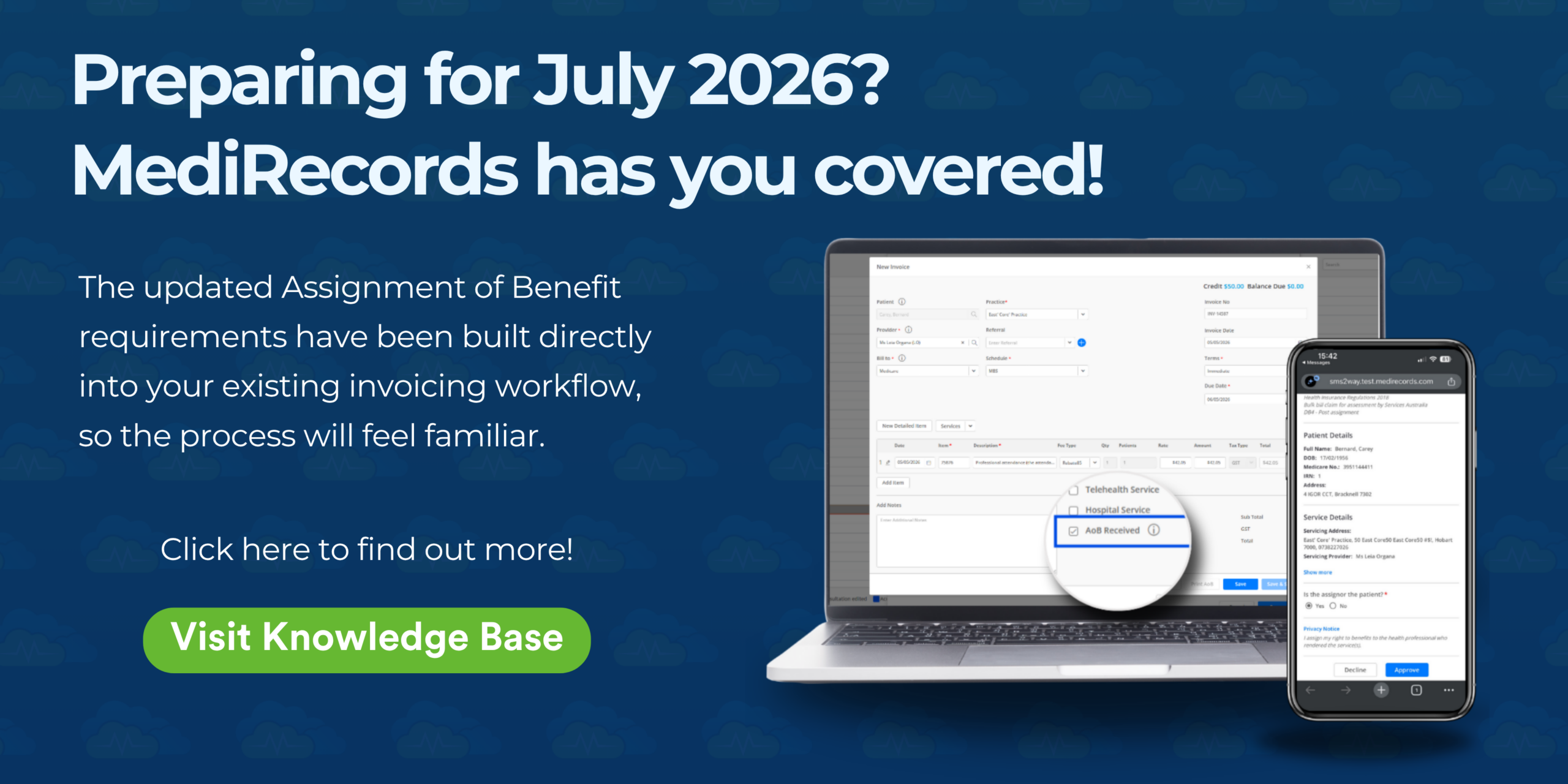
We have built the updated AoB requirements directly into our customer’s existing invoicing workflow, so the process will feel familiar. To learn more, visit our Knowledge Base article, here. 

1.9 million Australians have a new GP. It isn’t you.

1.9 million Australians have a new GP. It isn’t you.

In the first half of 2024, an estimated 1.9 million Australian adults asked ChatGPT a health question.

That number comes from a nationally representative survey published in the Medical Journal of Australia in March 2025. It is what 9.9% of a 2,034-person sample reported they had actually done in the six months prior. Roughly the population of Adelaide, walking past their GP and asking a chatbot first.

The survey was conducted in mid-2024. By now, that number is almost certainly higher.

The story underlying the data is about what patients do when the system is too slow or too difficult to navigate, and what it means for the future of AI in general practice.

What the data on patients using ChatGPT shows

The 9.9% headline gets cited everywhere, but it’s the patterns underneath that tell the real story. ChatGPT use was higher, not lower, among Australians with limited or marginal health literacy.

Among users, 18.4% had limited or marginal health literacy. Among non-users, the figure was 9.4%. The narrative that AI is a tool for the digitally-fluent does not hold up under the data.

People are reaching for it when they find the formal system too hard or too expensive to navigate.

Use was also substantially higher among Australians born in non-English speaking countries (29.2% of users, against 18.4% of the broader sample). Among people who speak a language other than English at home, 38.0% had used ChatGPT for a health question, compared with 24.2% of the sample overall. ChatGPT is functioning as a translation layer for cohorts the system has historically served poorly.

The most concerning part is what people are using it for.

61% of users asked at least one higher-risk question. That category includes asking what symptoms mean, asking what to do about a specific health issue, asking whether they should see a doctor, and asking ChatGPT to interpret blood test or imaging results. These are questions that, historically, would go to a clinician.​

Trust in the responses sat at a moderate 3.1 out of 5. Patients are using ChatGPT knowingly, with calibrated expectations, and they are doing it anyway.

The third person in your consult room

The patient sitting in front of a GP today may have already asked an AI what their symptoms might mean, and what they should do about them. They may have a translated explanation of their last blood test pulled up on their phone. They may have arrived with a list of follow-up questions seeded by a chatbot during the wait.

The interaction looks different from a Google search, which points people to references and leaves them to their own devices, without offering an opinion or any personalisation. ChatGPT asks follow-up questions, holds context across a thread, and produces something that feels like advice rather than search results. Patients arrive at the consult partially informed and looking for validation or correction.

Clinicians are already grappling with this shift, and the instinct for some will be to push back. Don’t believe what ChatGPT tells you. It gets things wrong.

That instinct is understandable. Early models did get things wrong, sometimes in ways that made the news… but it misreads the moment. The patient using ChatGPT to translate a pathology report into plain English is looking to participate in their own care.

The choice that matters is what the practice does with that.

What AI in general practice means for the tech stack​

If patients are using AI to access and contextualise their healthcare, and the data says they are, that has implications beyond the consult room. It changes what a modern practice looks like. It changes which tools belong in the workflow. And it raises a question most practice owners haven’t yet sat down to answer.

What does our technology stack need to do for our patients, not just for us?

 The technology already exists. AI scribes, patient-facing explainers, secure ways to bring AI into the clinical workflow rather than around it. None of this is theoretical. The hard part is choosing what fits a specific practice without being dragged into a wholesale platform change every time the market produces something new.

That is a harder problem than it looks, and it sits on top of the workforce pressures already documented in the RACGP’s Health of the Nation 2025 report. It is not one solo GPs or stretched practice managers should be expected to solve alone.

The conversation worth having

This is part of what’s on the agenda for Evolution or Extinction of the GP Landscape, a session at the Digital Health Festival on 20 May featuring our Chief Product Officer, Jayne Thompson and Dr Max Mollenkopf. 

If you’ll be at the festival, come along. If not, watch this space.

Re-thinking general practice beyond the clinic walls

Re-thinking general practice beyond the clinic walls

by Dr Gaveen Jayarajan

This article was originally published by GPRA Futures, a dedicated showcase of future thinkers, provocateurs, and healthcare innovations from visionary start-ups to established developers.

Can you please give a brief overview of your career to date, including qualifications and career pathway?

I graduated from The University of Melbourne in 2003 then worked in public and private hospitals as a resident and locum doctor for 4 years before starting my GP training, which I finished in 2010. I then worked full-time in several GP clinics till 2017, after which I moved to focus on full-time work in aged care, only visiting residential aged care facilities as part of a mobile GP practice. In 2022 I started my own solo mobile GP practice, Doctors in Aged Care, and continue this work today.

This year we became one of the first AGPAL-accredited mobile GP practices in Australia, accredited under the RACGP 5th Standards as a non-traditional practice without a physical premises/consulting rooms.

Doctors in Aged Care also has a dedicated Facebook Group with over 2700 doctor members where peer-to-peer learning and discussion occurs about all things related to aged care from administration, Medicare, clinical and organisational aspects.

What is the product you are using?

I use MediRecords as my clinical and practice management software as it gives me much greater reliability and speed working in mobile settings and without relying on remote access connections to access server-based software. It also provides much greater security along with automatic backups and ensures my IT costs are kept to a minimum by avoiding the need to pay for expensive third party IT service providers and maintaining hardware such as servers.

I also use Snapforms for various online forms that integrate directly into MediRecords and can auto-populate fields — for example, using an online new patient registration form that automatically creates a new patient file in MediRecords with certain demographic fields populated and a copy of the form automatically uploaded to the Correspondence tab.

I don’t use any AI software at present, but I do use a text shortcut software called Phrase Express to speed up my note-taking significantly.

What do you see as some of the enablers and barriers to health innovation in primary care in Australia?

Enablers include the current economic climate with rising costs across the board meaning we need to find new ways of doing things in order to be leaner, more efficient and thus more financially sustainable. I think there is openness to such innovation amongst the GP community.

Barriers include current operating models where GPs are operating their own independent medical practices within a common physical premises with the Practice Owner providing administrative and support services. Owners somehow need to cater to the needs of these individual GPs running their own practices and be able to customise their offering to each GP without increasing their costs too much.

A significant change — like a change of practice software — is harder to achieve in this situation as buy-in from many independent doctors is needed, who won’t necessarily see any direct financial benefit if their services fees remain the same and may be resistant to alterations to their usual workflows.

What do you think the future of general practice looks like?

I think the future of general practice will need to move towards one that is underpinned by modern cloud-based software that is more secure, scalable and interoperable. One where face-to-face visits are complemented by phone and video consultations as well as asynchronous communications via cloud-based patient portals, where patients have more access and visibility over their own patient health records.

It will incorporate new operating models such as the use of more virtual or remote administrative and support staff to reduce operating costs and improve financial sustainability. GPs must expand their service offerings and become more accessible to counter the effects of the Telehealth/Online-only providers that are providing more convenience to patients, but without the continuity of care that patients should expect.

Why is it important GPs are involved in health innovation/new technology design?

GPs should be involved in the early stages so the products built are fit for purpose and designed with fewer iterations and ultimately lesser time and cost. Incorrectly designed software will get very little traction amongst GPs, who will not have the time to see patients and adjust to this with work-arounds.

What would you say to early career doctors about general practice/primary healthcare?

Early career doctors should ensure they get the broadest exposure to General Practice through the different medical centres they work in, and later on consider sub-specialisation into a niche area that suits their interests and abilities and meets their financial and lifestyle objectives and family needs.

Let the work fit into your life, not the other way round!

This article was originally published by GPRA Futures, a dedicated showcase of future thinkers, provocateurs, and healthcare innovations from visionary start-ups to established developers.

Opening a medical practice involves more than finding a location and hiring staff. From Medicare compliance to digital health registrations, there are many steps to get right. We’ve simplified the process into a practical checklist to help you launch a modern, compliant clinic with confidence.