Sparked Standards in Action with MediRecords
 

Sparked Standards in Action with MediRecords

How MediRecords is applying Sparked standards to enable real-world healthcare interoperability.

Australia’s healthcare system is advanced in many ways, but when it comes to health information-sharing, the experience is still far from seamless. Gaps in communication between GPs, hospitals, and allied health providers can result in fragmented care, repeated tests, and lost or inaccessible patient data. 

In the recent Sparked Standards in Action Showcase, MediRecords joined other industry leaders to discuss these challenges, and how we’re addressing them by implementing national interoperability standards like FHIR, AU Core, and AU Patient Summary. 

MediRecords’ Tim Pegler, Business Development Manager, and Sanjeed Quaiyumi, Technical Product Manager were interviewed by Michael Hosking, former Deputy Lead for Community and Engagement at Sparked. Together, they explored: 

  • The biggest challenges in health data exchange today 
  • How Sparked standards like FHIR, AU Core, and AU Patient Summary are making a difference 
  • Real-world examples of MediRecords’ work in Defence, Northern Health, and beyond 
  • A live demo showing what interoperability looks like in practice 

Watch the full showcase below to see the discussion and demo in action. 

Challenges highlighted in the showcase 

As discussed in the video, Australia’s healthcare system still faces persistent challenges with information-sharing. Breakdowns in data flow can have serious consequences for patient safety and create costly inefficiencies. 

At MediRecords, we see this every day, not just as healthcare users ourselves, but as a digital health vendor. As early adopters of FHIR, we know the potential of modern standards to improve safety, enable innovation, and connect systems in real time. But without universal adoption and enforcement, vendors still face barriers when integrating with legacy systems that haven’t embraced FHIR. 

As Tim Pegler shared during the showcase: 

“While these gaps remain, no one will axe the fax.” 

From repeated medical histories to duplicate records and patient ID issues, the challenges are both clinical and financial. Until the sector embraces coordinated, enforced standards, many systems will continue speaking the same language, but in incompatible dialects. 

MediRecords in action 

MediRecords has implemented AU Base, which is central to interoperability in the JP2060 Defence Force project, connecting with other vendor systems in real time. We’ve also applied AU Base at Northern Health to support ePrescribing in the Victorian Virtual Emergency Department. Looking ahead, AU Core and eRequesting are both progressing through pilot implementations. And right now, we’re focused on the AU Patient Summary, which will be the foundation for true consumer empowerment as people move through the healthcare system. 

 Explore our APIs and FHIR capabilities, and view our FHIR roadmap to see what we’ve delivered and what’s coming next.

Looking ahead with Sparked 

The challenges are real, but so is the progress. Through the Sparked community, vendors, clinicians, consumers, and government are coming together to design, build and adopt common standards. While this is only the beginning, these efforts are already making a difference, and this is only the beginning. 

At MediRecords, we’re proud to be a Sparked foundational member, working alongside other community members to help shape the future of healthcare interoperability in Australia. 

Faster and secure payments with MediRecords’ Stripe integration
 

MediRecords + Stripe

Faster and secure payments with MediRecords' Stripe integration

MediRecords now integrates with Stripe, offering a comprehensive in-app payment solution that simplifies financial workflows for healthcare practices.

MediRecords + Stripe integration

The MediRecords and Stripe integration enables practices to process payments seamlessly within the MediRecords platform, eliminating the need for third-party terminals or platforms.

With secure, PCI-compliant transactions, automated reconciliation, and flexible surcharging options, practices benefit from fast, reliable transactions that streamline financial operations. By consolidating both clinical and financial tasks within the platform, practices can save time, reduce costs, and focus on delivering exceptional patient care. 

This is just the beginning, additional features will continue to roll out to further enhance Stripe’s functionality in MediRecords.

Phase 1 of the MediRecords Stripe integration includes:
Why use Stripe in MediRecords?

MediRecords’ Stripe integration includes a built-in surcharging mechanism, giving practices the flexibility to either pass transaction fees to the payer or absorb them into their rates. MediRecords allows for seamless, one-click payments following consultations or upfront deposits, eliminating delays from direct deposits and reducing the need for follow-ups. While the payment process is handled within MediRecords, patient credit card details are not stored in the system. Instead, they are securely stored within Stripe, ensuring compliance with payment security standards.

Additionally, refunding Stripe payments through MediRecords automatically processes the refund via Stripe, removing the need for manual reconciliation between systems.

Example use cases

GP practice with returning patients: Returning patients can conveniently save their card details to simplify payments during consultations or to facilitate pre-payments or deposits when arranging future appointments.

Clinic with phone bookings: When booking over the phone, practices can take pre-payment for the entire appointment cost as a deposit, which can be allocated to an invoice post-consultation. Cancellations are handled with flexible refund options and penalty invoices.

Travelling patient for a one-time visit: If the Patient is not a usual member of your practice, is travelling for a one time visit, or a current patient that is not comfortable storing card details, the practice can enter the card information at the time of the consultation for a single transaction without needing to store the details.

Already a MediRecords customer? Get set up with Stripe today

To get started with Stripe, setup must be completed by a practice owner. Explore the Knowledge Base for step-by-step instructions, configuration tips, and everything you need to enable payments in MediRecords.

New to MediRecords?

If you want to learn how the Stripe integration can assist you in your practice, book a demo with our Sales team here.

Frequently asked questions

Stripe is a globally trusted payment processing platform that enables businesses to accept and manage online payments securely. Known for its reliability and compliance with industry security standards, Stripe offers fast, secure, and seamless transactions. By integrating Stripe into MediRecords, healthcare practices can process payments directly within the platform, eliminating the need for external terminals and streamlining financial workflows.

MediRecords’ Stripe integration allows practices to process payments within MediRecords without the need for third-party terminals or platforms. Key benefits include: 

  • Secure, PCI-compliant transactions
  • Faster payment processing and automated reconciliation 
  • Built-in surcharging options 
  • Secure patient card storage for one-click payments 
  • Reduced no-shows with pre-payment options 
  • Streamlined financial reporting within MediRecords 

There is no cost to enable Stripe in MediRecords. However, Stripe processing fees apply. Practices have the option to pass these fees to the payer through built-in surcharging or absorb them within their costs. 

No, Stripe offers a standard rate for all customers upon registration. Fees may be negotiable directly with Stripe. If you choose to pass the fees onto the payer, it will cost nothing to you to process payments with Stripe as the fees will be added to the amount that is charged to the payer.

Yes, Stripe has restrictions on certain categories of businesses and practices that cannot use their service.  

If your business falls under one of those listed, it is best to contact Stripe directly to discuss.

No. MediRecords does not store any credit or debit card information. All credit/debit card and cardholder information are sent directly and securely to Stripe, where it is stored within their top-level infrastructure, which is fully PCI Level 1 certified to the highest standards. MediRecords only stores encrypted payer tokens and payment reference numbers and does not retain any other identifiable information in their servers. More information about Stripe security can be found here. 

Yes! During the connection process, simply type in the previously registered email address on the first page and follow the prompts to connect the account This will connect your existing account to MediRecords, and you can retain the previous transaction history within your dashboard. – statics.teams.cdn.office.net/evergreen-assets/safelinks/2/atp-safelinks.html

Now Live: New Patient Header enhancements
 

Now Live: New Patient Header enhancements

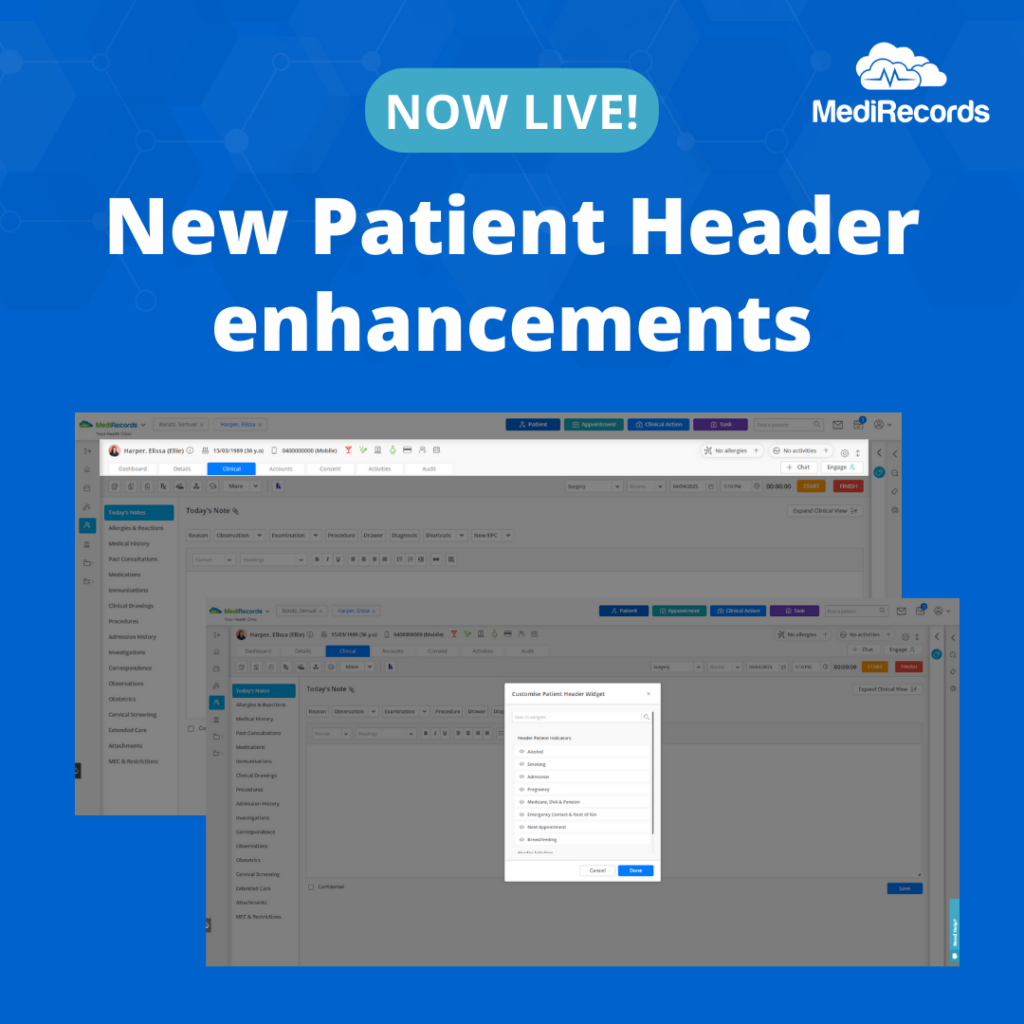
Making patient information easier to navigate with a collapsable and customisable patient header.

MediRecords is excited to announce new enhancements to our Patient Header, with the introduction of  Expand/Collapse and Customisation features. These enhancements are designed to make viewing patient information simpler and more efficient.

Expand/Collapse button

This enhancement introduces an Expand/Collapse button, allowing users to minimise the Patient Header. By collapsing the header, clinicians and administrative teams can maximise vertical space for viewing Patient Records, while retaining access to important patient details. The feature is designed to simplify workflows and enhance usability within the MediRecords platform.

Key benefits of the Expand/Collapse button Include:
  • Visibility: The Collapse/Expand Button is located in the top-right corner of the Patient Header, making it easy for users to find and use the feature.
  • Functionality: With just one click, users can collapse the header to hide details or expand it again to display the information they need.
  • Smooth transition: Transitions between collapsed and expanded views are smooth and responsive, ensuring a seamless and intuitive user experience.
  • State retention: The system remembers the user’s selected state -collapsed or expanded – throughout their session in MediRecords, allowing for uninterrupted workflows.
Customise Patient Header Widget

In addition to the Expand/Collapse feature, MediRecords has introduce the Customise Patient Header Widget. This functionality allows all user roles to personalise the widget by selecting up to eight Patient Indicators, tailoring the header to personal and practice preferences for a more efficient work environment. 

You can access the Customise Patient Header Widget in the top right-hand corner by clicking the cog wheel in the Patient Header, and selecting the patient indicators you would like to display. 

To learn more about these new enhancements, visit the following Knowledge Base article: 

Need further assistance? If you are a current customer, please contact your Customer Success Manager or our Support team – [email protected]

MediRecords set to launch Evolve AI commencing with AI Patient Summary

MediRecords set to launch Evolve AI, commencing with AI Patient Summary

MediRecords, the leading Australian provider of cloud electronic health record and practice management software, is proud to announce the launch of its AI technology suite, MediRecords Evolve.

This new addition to MediRecords’ trusted true cloud technology stack integrates directly with the core Care clinical platform and will provide real-time insights based on patient information.

Co-designed with our clinical advisory team, Evolve will streamline clinic workflows, simplify administrative tasks, and enable clinicians to make data-driven decisions faster.

The first MediRecords Evolve feature, AI Patient Summary, is being tested with selected clients in March. The AI-driven patient summary provides a synopsis of a patient’s past three consultations within seconds, enabling clinicians to quickly review key points of case histories.

The Evolve-powered patient summary includes recent investigations, correspondence, clinical notes and provides shortcuts to detailed consultation records.

“The launch of MediRecords Evolve marks a significant and natural progression in our mission to harness technology for the benefit of healthcare professionals,” said Matthew Galetto, CEO and Founder at MediRecords. “This follows our earlier partnership with Heidi Health for integrated AI scribe technology, and our commitment to other partnerships to power smart healthcare.”

Mr Galetto said, “We chose the name ‘Evolve’ because our AI capabilities will continuously adapt and advance in response to the needs of clinicians, transforming the way patient information is accessed and utilised. AI Patient Summary is the first step in this evolution, helping to reduce cognitive load, improve decision-making, and ultimately support better patient outcomes.”

Built on MediRecords’ true-cloud platform, Evolve offers enterprise-grade security, data privacy compliance, and scalability, ensuring healthcare providers can access AI support securely from anywhere.

The introduction of AI Patient Summary is the first step in MediRecords’ broader AI strategy. Future enhancements include:

MediRecords Evolve enhances the existing Care, Connect, and Engage product suite, further optimising clinical efficiency and driving high-quality, outcome-focused patient care.

Learn more

For further information on MediRecords Evolve initiatives, sign up for updates below.

About MediRecords

MediRecords is Australia’s leading provider of true cloud-based electronic health record (EHR) and practice management software. Committed to innovation and excellence, MediRecords delivers scalable, interoperable, and secure solutions that enable healthcare professionals to provide high-quality patient care, anywhere.

Media Contact
Tim Pegler
Senior Business Development Manager
0435 444 690

Be the first to know about MediRecords Evolve!

Complete the form below to stay informed about key updates and launch details.

Sizzling summer updates


Sizzling Summer Updates

The MediRecords team is turning up the heat this summer with a range of exciting product enhancements!

Inspired by user feedback and our team’s appetite for innovation, the enhancements include streamlined prescribing and clinical workflows, centralised billing for multi-practice sites, user customisation options and much more. These sizzling updates are designed to boost efficiency and enhance your experience with MediRecords!

Check out the enhancements below, and stay tuned for even more enhancements that will supercharge your productivity and elevate your care this summer. Releases for these new features will start from 27 January 2025. Please refer to the table for the scheduled release dates. Note that these dates are subject to change, so we recommend checking back regularly, as the table will be updated as features go live.

Enhancement Name

Enhancement Description

Availability

Status

Prescribe menu labelling update

The prescribing drop-down menu options are being renamed to provide clearer, more intuitive labels, ensuring prescribers can easily understand their actions. There are no functional changes, just improved labels for ease of use:

  • E-Prescribe → Save Draft (eRx)
  • E-Prescribe and Print → ePrescribe
  • Prescribe → Save Draft (Paper)
  • Prescribe & Print → Prescribe (Paper)
  • Prescribe and New → Save and New (Paper)

This update aims to enhance user experience by offering more transparent and descriptive button labels.

All customers

(Standard and Premium)

Release Completed

Enhanced dose list & search function

The Dose menu in the prescribing window will soon include additional options and a search feature. This update will support prescribers, particularly in medicinal cannabis clinics, by offering more accurate dose choices, such as 0.5ml or 1 puff, and saving time when creating prescriptions. The new search functionality allows providers to quickly find the doses they need and easily save them to their Favourites, eliminating the need to manually enter doses for each prescription.

All customers

(Standard and Premium)

Release Completed

New medicinal cannabis forms in Drug Recipes

The Drug Recipe form list will soon be expanded to include Dried Herb, Dried Flower, and Cartridge options. This update will provide medicinal cannabis clinics and prescribers greater flexibility, allowing them to describe medications more accurately and streamline the prescription process.

All customers

(Standard and Premium)

Release Completed

PBS/RPBS filter enhancement

Easily filter out non-PBS/RPBS medications to streamline prescribing for patients eligible for reduced pharmacy costs. The filter can be applied across drug searches, Drug Recipes, Drug Classes, and Favourites, ensuring you only see PBS/RPBS-listed medications, saving time and improving prescribing accuracy. Ideal for providers who prescribe predominantly from the PBS/RPBS list, such as GPs who bulk bill.

All customers

(Standard and Premium)

Release Completed

Enhanced medication view: Added Prescribed As, Days Between Repeats and Annotations

The Expanded Medication View will soon include Prescribed As, Days Between Repeats, and Annotations, allowing prescribers to easily review key prescription details and how medications were prescribed, all within the Medications grid.

All customers

(Standard and Premium)

Release Completed

Extended Prescription Preview Area

The Prescription Preview display area will be expanded and headers added, enabling users to easily view prescription information from any page in the prescribing workflow, at any time.

All customers

(Standard and Premium)

Release Completed

AIR Claim Status & Failure Messages in Immunisation Grid

AIR Claim Status and Failure Messages will be added to the patient’s Immunisation Grid, allowing users to quickly view the status of outstanding claims or check if an immunisation has been successfully claimed, all within the patient context. This update will help streamline the process of managing immunisation claims.

All customers

(Standard and Premium)

Release Completed

Admission Notes Custom View

The Admission Notes Custom View allows users to personalise their experience by choosing between the existing summary view (the new default option) or a new detailed preview option. This enhancement eliminates the need to open each individual note, enabling users to quickly navigate through patient notes. By saving time and reducing clicks, this feature streamlines the workflow and improves overall efficiency.

Admissions Customers (Premium)

Release Completed

Enhanced Route List & search function in Drug Recipes

The Drug Recipe Route list now aligns with Medications for improved accuracy in electronic prescribing, with a new search function to streamline recipe creation.

All customers

(Standard and Premium)

Release Completed

New Clinical Templates

Discover a comprehensive suite of new clinical templates designed to enhance assessments, streamline care delivery, and support informed decision-making. These include:

  • Observations: Range of Motion (ROM) Upper Limb, Range of Motion (ROM) Lower Limb, Audiogram
  • Examinations: Absolute Cardiovascular Risk Assessment (CVD), Pain Scale Assessment, Glasgow Coma Score/Scale, Eye-Enhanced, Anthropometry, Sharpened Romberg, Neurovascular
  • Health Assessments: Alcohol Use Disorders Identification (AUDIT), Post-traumatic Stress Disorder Checklist (PCL-5)

All customers

(Standard and Premium)

Release Completed

Enhanced Centralised Billing for multi-location practices

MediRecords recently introduced Centralised Billing, enabling users to easily create and manage multiple practices within a single MediRecords customer account. This feature simplifies payment management for organisations with multiple locations. In our upcoming release, you’ll be able to select the desired practice directly from the Invoices, Quotes, Adjustment, and Payment screens. This update will save you time, reduce clicks, and create a more efficient billing process.


For instructions on how to enable Centralised Billing, visit our Knowledge Base article here.

All customers

(Standard and Premium)

Release Completed

Invoice Notes enhancement

Invoice Notes will soon be updated regardless of the invoice status. Previously, the Notes field was disabled once the invoice transitioned away from 'On Hold,' preventing users from capturing important updates like payment delays or awaiting cheque details. With this enhancement, users can maintain a running commentary and add any relevant information about the invoice at any stage, ensuring full visibility and better tracking throughout the payment process.

All customers

(Standard and Premium)

Release Completed


New Account Notes feature

A new feature for adding, updating, and managing account-related notes will soon be available in the billing section of the Accounts Tab. With the upcoming Notes feature directly in the Accounts tab, you’ll be able to capture and access account-specific notes without leaving the billing area. This update will streamline your workflow, keep patient records organised, and ensure important account details are always easily accessible.

All customers

(Standard and Premium)

Release Completed

Credit information added to Invoice

The credit and balance due information will be added directly to the invoice, providing increased visibility of the patient’s account. This enhancement streamlines billing by making it easier to track payments and balances when billing from an appointment or the Waiting Room.

All customers

(Standard and Premium)

Release Completed

Ability to send an email to multiple recipients

The new multi-recipient email sending feature will allow users to send emails to multiple recipients simultaneously using the ‘Copies To’ field in Email on Demand. The enhanced ‘Recipient’ field under the Contact tab will also support multiple contacts, ensuring secure and efficient communication. This update streamlines workflows, reduces manual effort, and strengthens audit capabilities.

All customers

(Standard and Premium)

Release Completed

New Patient Header Expand/Collapse feature

A new Collapse/Expand Header feature will soon be introduced in the Patient Header Section, allowing users to manage screen space efficiently. With clearly visible buttons, users can toggle between a full or condensed view, improving navigation and maximising vertical viewing for Patient Records.

All customers

(Standard and Premium)

Release Completed

New Customisable  Patient Header Widget

The new Customise Patient Header Widget feature will soon allow users to tailor the Patient Header to their unique preferences. With the “Customise Patient Header” toggle, users can personalise the widget and adjust header settings to display the most relevant information. Practices can enable this feature by contacting their Customer Success Manager. Once enabled, users can access the 'Customise Patient Header Widget' in the top right-hand corner of the Patient Header and select up to eight Patient Indicators for a more streamlined and personalised view.

All customers

(Standard and Premium)

Release Completed

Want to know more about the upcoming features?

Current customers can contact their Customer Success Manager or email  [email protected] for more details.

New to MediRecords? Click the button below to schedule a demo with our Sales team!

Deposits in MediRecords: A Smarter Way to Manage Pre-Payments and Patient Credits

Deposits: A smarter way to handle pre-payments and patient credits

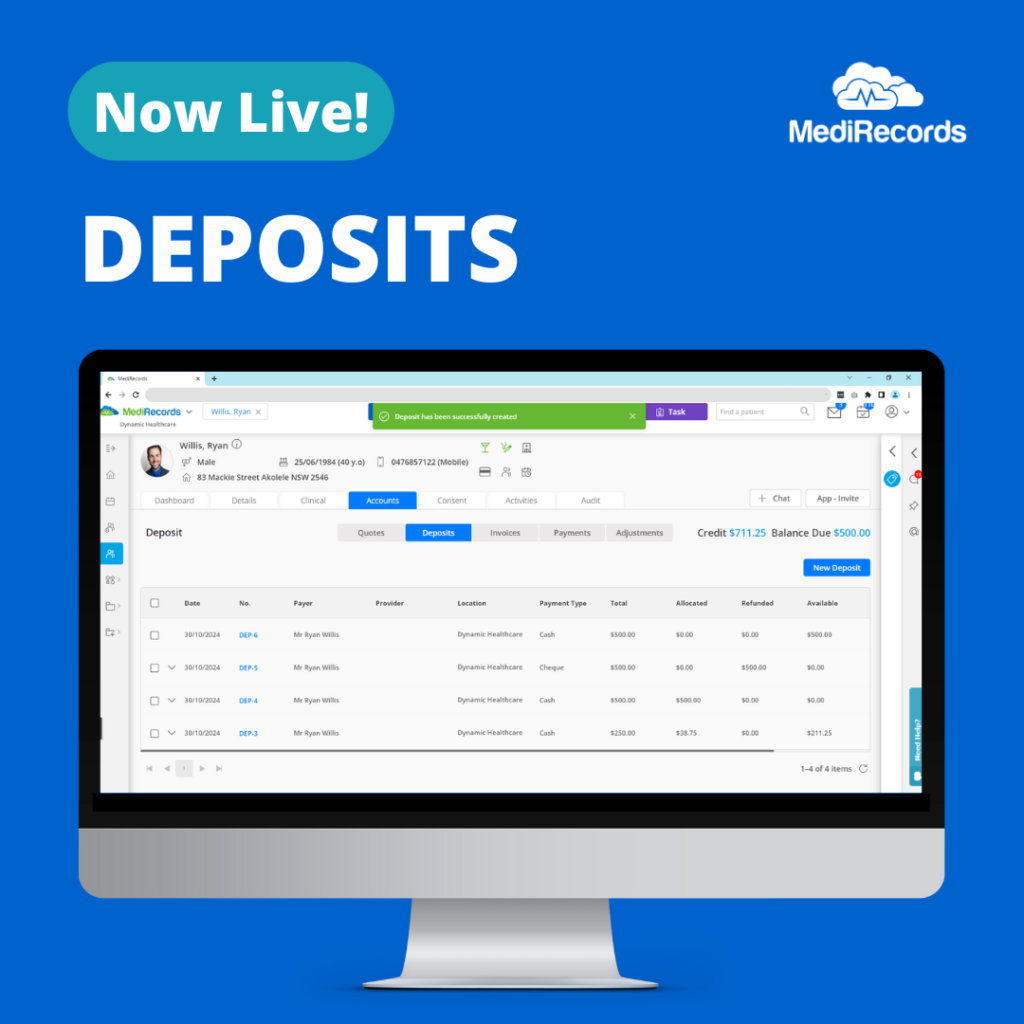
Deposits is now live in MediRecords, providing practices with an easy and organised way to manage pre-payments and payment plans.

Designed for practice managers, billing agents, administrative staff, surgeons, and specialists, Deposits offers an intuitive way to handle funds from the initial quote, right through to the final payment.

With Deposits, users can easily record pre-payments, hold credits in a patient’s account, and apply funds directly to invoices as needed. This dedicated space for deposits in each patient’s account eliminates the need for manual tracking, creating a clear and easy payment process. Deposits provides flexibility to distribute funds across multiple invoices, making it ideal for a range of scenarios—from pre-paid sessions to payments for high-cost surgical procedures.

A new Centralised Billing configuration allows practices with multiple locations to create deposits for different practices within the same MediRecords customer account, without needing to change the viewed practice. This is a game-changer for multi-location practices or practices with central billing teams, providing a more streamlined experience across locations.

MediRecords Product Owner Megan Harker said, “Deposits is designed to be streamlined and flexible. Our goal was to create a feature that could support all service offerings—whether it’s capturing a booking fee when scheduling an appointment or maintaining a record of an incremental payment plan leading up to a procedure. We also prioritised making Deposits information-rich, ensuring that every transaction is recorded in real time, both in the patient record and in reporting.”

Key Benefits of using Deposits
  • Easy tracking: Record and track deposits within the patient’s account. A detailed transaction history is available at a glance.
  • Flexible application across invoices: Apply funds to one or multiple invoices, or combine deposits into a single payment when covering multiple services.
  • Refund and credit options: Refunds can be issued to the patient or held as a credit for future use, providing flexibility for various patient payment preferences.
  • Detailed reporting: A dedicated Deposits Report tracks every movement throughout the deposit’s lifecycle, from creation to allocation and refunds. This ensures your practice’s financial incomings perfectly match the bank statement.
  • Centralised billing for multi-location practices: Create and manage deposits across multiple practices within the same MediRecords customer account, simplifying payment management for practices with multiple locations.
What makes MediRecords Deposits unique? 

MediRecords Deposits goes beyond traditional deposit management by allowing deposits to be shared across multiple providers. This is especially useful for surgical procedures that involve multiple billing parties. A single deposit can be used to pay the primary surgeon, assistant, and anaesthesiologist—all from the same payment.

Our platform also clearly distinguishes between patient credits and outstanding balances, enabling practices to view unpaid invoices alongside available credits in real-time. This structure reduces guesswork in financial reconciliation and promotes more accurate, efficient practice management.

Ready to start using Deposits in MediRecords? 

If you would like to read more on how to use Deposits, please visit the following Knowledge Base articles:

Example use case: General practice 

Emma books a consultation with her GP and makes a $50 deposit to secure her appointment. After the consultation, the clinic generates an invoice for $120, applies the deposit, and Emma pays the remaining $70 with her credit card, all in one seamless transaction.

Alternatively, if Emma books an appointment and pays a deposit, then needs to cancel, the clinic’s no-show policy allows them to refund $30 while retaining $20 as a cancellation fee, all tracked and processed through MediRecords’ Deposits feature.


Example use case: Surgical procedure 

John needs a $10,000 surgical procedure but can’t pay the full amount upfront. The practice uses MediRecords’ Deposits feature to set up a payment plan, allowing John to pay in instalments leading up to the surgery. Once the procedure is completed, the practice consolidates these instalments and allocates the funds across invoices for the primary surgeon, assistant surgeon, and anaesthesiologist.  This streamlined process ensures that the practice can easily track payments and maintain accurate financial records while offering flexibility to both the patient and the healthcare team.

Frequently asked questions

Deposits is designed for practice managers, billing agents, administrative staff, surgeons, and specialists who need a reliable method to handle pre-payments, especially for high-cost procedures or multiple-session treatments.

You can record a deposit directly in the patient’s account. Detailed instructions are available in the Knowledge Base under “How to Create a New Deposit?”. 

Yes, deposits can be distributed across multiple invoices, making it easy to manage payments for multi-service scenarios or complex billing cases.

Yes, MediRecords offers a dedicated transactional report for deposits, so every deposit’s movement is recorded and can be easily reviewed.

While there is a field available to earmark a deposit for a particular provider, this does not restrict the deposit to only that provider when it is applied to a payment. This flexibility allows a single deposit to be shared among all applicable staff members. For example, a primary surgeon, assistant, and anaesthesiologist can all be invoiced using the same deposit.

Yes, with Centralised Billing configuration, users can create a deposit for a different practice within the same MediRecords customer account, without switching views.

A deposit is a holding of funds, so it will not appear on any financial reports as “income” or “payment” until it is allocated to a payment. Similarly, it will only appear on the Banking Report once (on the day it is received) and not again when it is allocated to a payment.

The deposit portion of the payment will be reallocated to the patient’s credit pool, making it available for allocation to a new payment, if desired. If a full refund is needed (meaning the money is returned to the patient) a refund of the deposit can also be processed.

MediRecords teams with Heidi Health for smarter clinical notes
 

MediRecords teams with Heidi Health for smarter clinical notes

AI note-taking technology to streamline clinical documentation will be available in MediRecords from October.


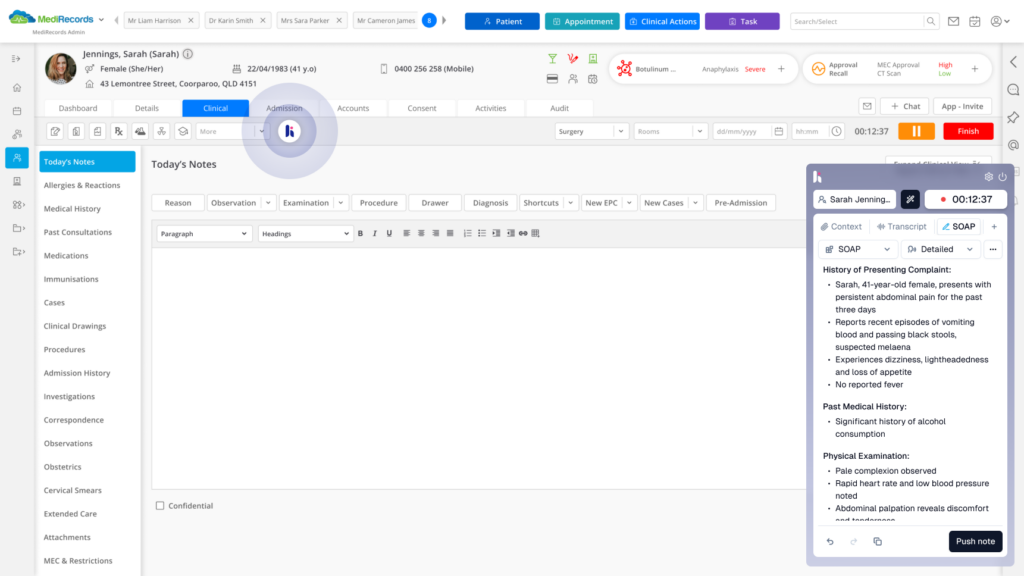
The leading cloud electronic health record and practice management system will offer an integration with Heidi Health’s AI Medical Scribe, enabling clinical consultations to be transformed into notes or documents in seconds. Doctors will not need to log into a separate software system, or cut and paste across browser tabs, thanks to embedded Heidi capability inside MediRecords.

Supporting millions of sessions per month, Heidi generates documents such as referral letters, clinical notes and Care Plans. With Heidi scribing, doctors can type less and reclaim time for patient care — or better work life balance.

MediRecords Founder and CEO Matthew Galetto said: “Everything we can do to improve working conditions for clinicians helps them provide better patient outcomes. We are excited about partnering with Heidi Health and our other AI initiatives on the way.”

Heidi Health Founder and CEO Dr Thomas Kelly said: “As a clinician, I recognise that doctors rarely experience benefits from introducing new tools. Heidi is the rare case where simply clicking a button can be life-changing, saving hours of work each day. We’re proud to be partnering with MediRecords, who have led the industry in cloud, interoperability and now, AI.”

Heidi Health data shows clinicians spend more than two hours per day on tasks other than patient care, losing up to $66,000 annually as a result. AI scribe technology means they can work up to twice as efficiently. Doctors who use Heidi report “getting home on time” and “taking their lunch break again.”

With a Heidi subscription, MediRecords users can launch AI ambient technology from their clinical dashboard, transforming consultations into templated notes for review by the user. Once reviewed, the notes are automatically added to MediRecords’ Today’s Notes field. Heidi Health technology is GDPR and APP (Australian Privacy Principles) compliant and ISO27001 and SOC2 accredited for security.

MediRecords is a multidisciplinary EHR and PMS system used by clients including Queensland Health, the Victorian Virtual Emergency Department and soon to be deployed by the Australian Defence Force.

Media inquiries

To arrange to speak with Mr Galetto, or for further information on MediRecords, please email Tim Pegler or call 0435 444 690.

To arrange to speak to Dr Kelly, please email [email protected].

Key features MediRecords customers can expect with Heidi AI Medical Scribe

AI Scribing

Rely on high-quality AI scribing for consultations lasting up to two hours, ensuring detailed and accurate notes.

Multilingual Scribing

Benefit from Heidi AI Scribe in 26 languages, supporting diverse patient communities.

Smart Transcription

Upgrade from traditional dictation to smart transcription. No need for manual commands like "Full stop. New line."

Custom Templates

Create your own note formats or choose from pre-built templates to suit your clinical workflow.

One-Click Access

Once configured, you can open Heidi AI Scribe directly within MediRecords without the hassle of separate logins.

Auto Documentation

Following clinical review, Heidi AI Scribe adds notes to Today’s Notes, streamlining your documentation process.

Interested in finding out more about Heidi AI Scribe in MediRecords?

Complete the form below, and a member of our team will be in touch. 


MediRecords wises up on CSIRO’s Smart Forms for Healthcare
 

MediRecords wises up
on CSIRO’s Smart Forms
for Healthcare

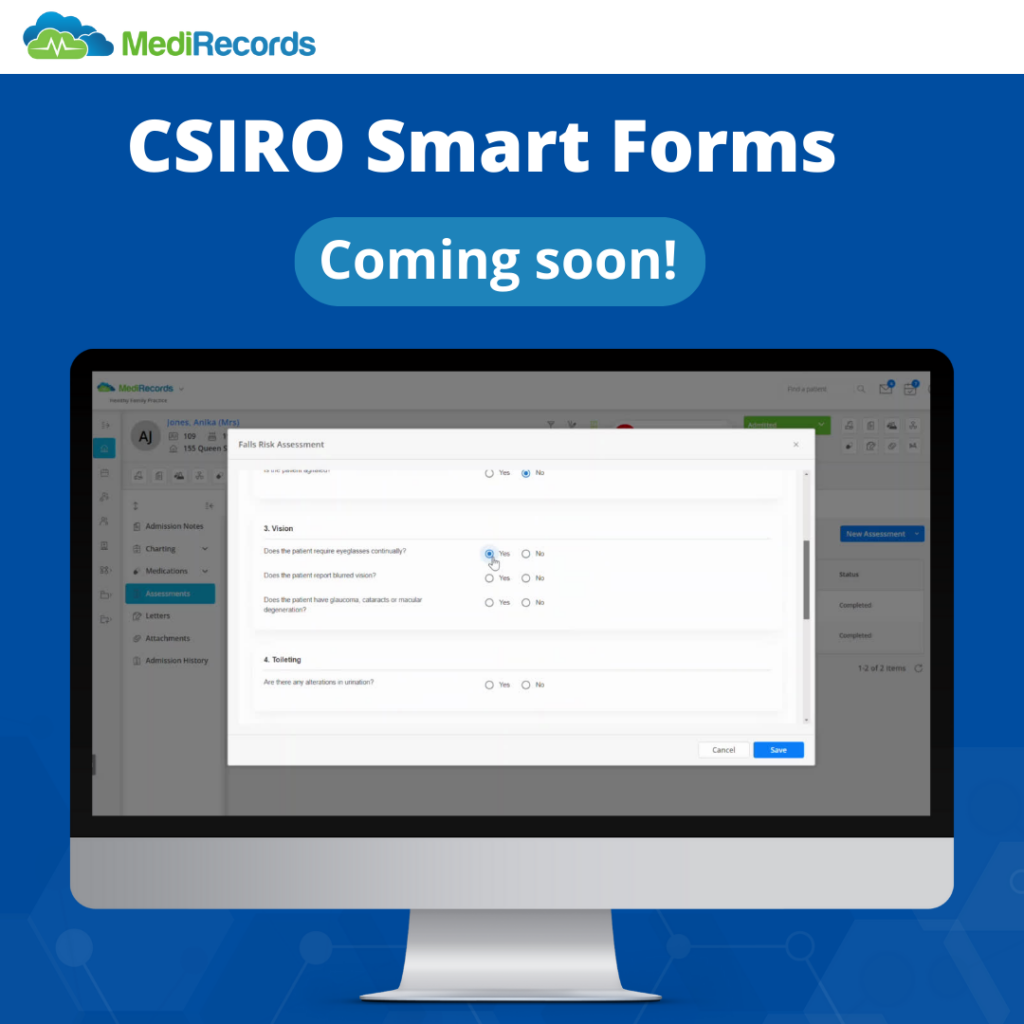
Leading cloud healthcare technology company MediRecords is deploying CSIRO’s open-source Smart Forms software to develop FHIR forms for rapid deployment into clinical use. 

The initiative will see Smart Forms technology deployed in the MediRecords platform, enabling faster access to new clinical assessment tools and patient surveys. 

The first Smart Form, a Falls Risk Assessment, is expected to be available in MediRecords this month. 

Commissioned by the Commonwealth Department of Health, Smart Forms technology was developed to improve health assessment procedures and clinical information sharing, leading to better patient outcomes. This was first demonstrated through the Aboriginal and Torres Strait Islander Health Check Assessment Smart Form. 

Standardised forms can streamline how clinicians capture patient data and simplify how this data is made available for research and other analysis. 

MediRecords Integrations Lead Sanjeed Quaiyumi said Smart Forms would accelerate the introduction of new health assessments within MediRecords. 

“MediRecords is laying the foundations for the adoption of Fast Healthcare Interoperability Resources (FHIR) in the broader health ecosystem, having developed and implemented an extensive library of FHIR and API resources. Smart Forms provide an exciting new way to gather and share data.” 

What are Smart Forms? 

Smart Forms conform to the HL7 FHIR Structured Data Capture and SMART App Launch Implementation Guides, ensuring seamless interoperability between clinical systems and applications. This standardised approach facilitates exchange of electronic health information across a diverse range of platforms. 

Key benefits of Smart Forms include: 

  • Interoperability: Facilitating seamless data exchange between FHIR-enabled healthcare applications and systems 
  • Adaptability: Customisable forms tailored to specific clinical contexts and user needs 
  • Standardisation: Adherence to standardised data formats and coding conventions for consistency in healthcare data representation 
  • Security: Robust security measures to safeguard patient data and maintain privacy 
  • User-Friendly Interface: Designed for accessibility across various levels of technical expertise 
  • Enhanced Workflow Efficiency: Streamlined data capture, retrieval, and exchange processes for improved decision-making and patient care coordination. 

MediRecords will use Smart Forms to expand its range of clinical templates, starting with the Falls Risks Assessment and extending to inpatient Admissions and Primary Care Assessments forms. 

This initiative underscores MediRecords’ commitment to driving innovation and enhancing healthcare outcomes through cutting-edge technologies. By harnessing the power of CSIRO’s Smart Forms, MediRecords aims to significantly improve data capture options, providing clinicians with advanced tools for delivering personalised patient care. 

MediRecords actively participates in the Sparked FHIR Accelerator community. Sparked is a collaboration between Department of Health and Aged Care, the Australian Digital Health Agency, HL7 Australia and CSIRO’s Australian e-Health Research Centre. 

Media inquiries:

For media inquiries or further information, please contact MediRecords Senior Business Development Manager Tim Pegler via [email protected]. 

References: 

Home – AU Core Implementation Guide v0.3.0-ballot (hl7.org.au) 

https://aehrc.csiro.au/wp-content/uploads/2023/11/2022_23-AEHRC-Annual-Report.pdf 

https://www.aihw.gov.au/reports/indigenous-australians/indigenous-health-checks-follow-ups/contents/timeline-of-major-developments-in-health-check-imp  

Email on Demand is now live on MediRecords
 

Email on Demand is now live on MediRecords!

Enhance your communication workflow with Email on Demand –
MediRecords' latest feature!

We are excited to share that Email on Demand is now live on the MediRecords platform! This new feature allows our users to send emails directly from MediRecords, removing the need to download files or switch between applications. By using our new email solution, users can streamline their communications, save resources, and have more time for patient-focused care.

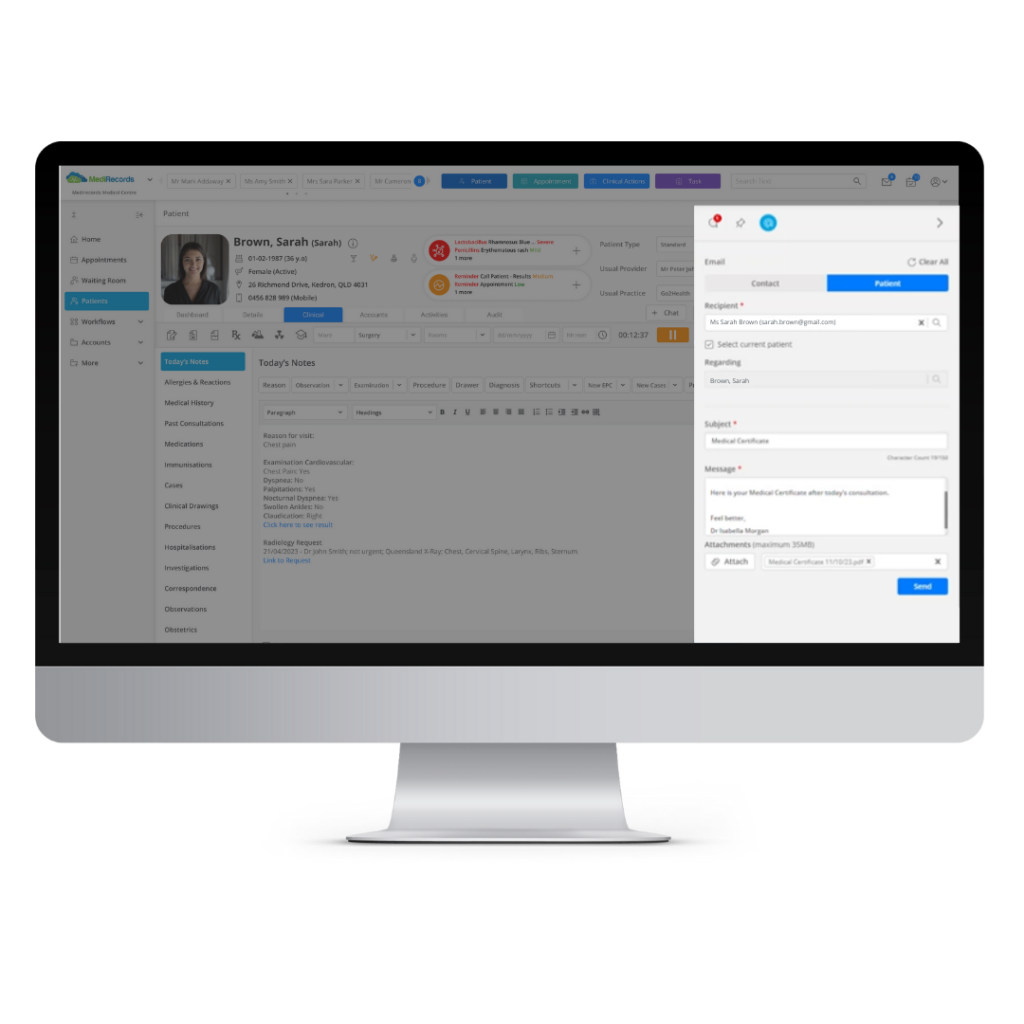
Users can now access Email on Demand from the Universal Communications Bar, which is located at the top right-hand corner of the MediRecords platform. When users click on the email icon, they will see a pop-up window where they can compose and send an email. Users can also attach documents from MediRecords files or from their local device.

When using Email on Demand within a patient record, users can simply tick the checkbox to Select Current Patient, and the Recipient and Regarding fields will be automatically filled with the applicable details.

Email on Demand is a useful feature that helps to optimise workflows and efficiency with benefits including:

  • Emailing clinic rosters and staff updates to internal practice users
  • Sending attachments to patients such as a Health Summary, Care Plan, prescriptions, medical certificates, and education resources.
  • Sending multiple document attachments to external healthcare professionals, regarding a specific patient.

Interested in exploring Email on Demand further? Book a demo with our Sales team, and discover how Email on Demand can help to optimise your practice’s communications.

Frequently asked questions

Any document created as a New Letter or Imported into the Correspondence OUT grid will be available to be attached, provided that the letter status is Final. This means Investigation Requests, Invoices, Patient Education, and more, can be sent via email after being uploaded to the Patient’s Correspondence.

While you won’t be able to receive a direct reply into MediRecords, you can include Reply-to instructions in the body of your email. All emails will come from a clear no-reply email address with an embedded footer that also indicates the inability to receive replies.

Yes, you can send as many emails as you like, however you will be unable to include multiple recipients on one email at this stage.

To keep your email safe and secure, the recipient’s email address must be confirmed and saved within a Patient Record or Contact.

As with most email servers, a failure to deliver can take a long time and is not always immediately apparent. While you won’t be able to see a delivery status within MediRecords, if you’re concerned your email has not reached its destination, please speak to our Support team.

A sent email will be logged as a Task in the Activities screen, and within the Patient’s Activities tab. This entry will include comprehensive details of the email, including all recipient and patient information, and even whether a file was attached or not, to provide peace of mind that your email went to the right place, and that you didn’t forget to attach that document.

MediRecords utilises SMTP Port 587, as do many other major industry mail clients, such as Microsoft Outlook and Apple Mail. This is highly secure, encrypted and reliable, with additional layers of security compared to other ports.

Looking to stay updated with the latest from MediRecords?

Sign up to the newsletter

    Investigations: Improvements & new features
     

    Investigations: Improvements & new features

    How MediRecords is introducing smart new ways to manage Investigations requests and results.

    In MediRecords, ‘Investigations’ comprise the pathology and radiology Requests and Results that are housed within a Patient Clinical File.

    Once a patient has completed a test or scan, if the MediRecords practice is using Secure Messaging, results are sent direct to the MediRecords Inbox where clinicians can review the contents, create any follow-up recall activities, and link these to the Patient Clinical File. Alternatively, the practice may choose to manually upload results via the Inbox or the Patient Result Grid.

    MediRecords has recently updated the Investigations feature with new features to make workflows more efficient and convenient. Here are some of the benefits our users will enjoy thanks to improvements across Investigations:

    Save time and hassle: Easily renew a request by duplicating a prior request with the same details. These pre-filled referrals are beneficial for monitoring chronic conditions and for recurring tests. For example, suppose a patient needs a blood test every three months to check their cholesterol level. In that case, the clinician can simply renew the previous request and send it to the pathology provider without having to fill most of the details again.

    Keep track of patients’ results: Users can now link a Patient Result to the original Request from within the Patient Result Grid, to allow an end-to-end workflow for manual and/or paper results. This new feature enables users to close the loop for manual results by allowing them to connect two items and then update the Status of the original Request to Partially or Fully Received, with a couple of clicks. For example, if a patient has completed a chest x-ray to diagnose possible pneumonia, the clinician can easily link the Result to the Request from the Patient Result Grid, then update the Status of the Request to indicate that the Results have been received and reviewed

    Work at your own pace: Create a draft request and save it for later. This allows clinicians to add information or make changes. before marking a Request as outstanding. This becomes particularly useful when a patient may require a radiology test or scan, but pathology tests need to be completed prior. The clinician can create a draft Request and save it in the patient’s record. They can then edit the Request later to add more details (e.g. outcome of pathology results).

    Customise workflows & allocate new levels of priority: Our new priority fields provide more options on the level of urgency (e.g., routine, urgent, ASAP, STAT) of a request. We have also added new filters to help sort and search for patient requests and results.

    Looking to stay updated with the latest from MediRecords?

    Sign up to the newsletter